
Introduction
The enterprise WAN has changed for good. TeleGeography's 2026 WAN Manager Survey found that 63% of enterprises now run SD-WAN, with another 15% rolling it out. MPLS still appears in most networks, but it now connects only 22% of sites on average, while direct internet access connects 54%. Gartner's 2026 Market Guide for SD-WAN describes a mature market that is steadily becoming part of SASE.
For Cisco customers there is a second driver: hardware lifecycles.
- Support for vEdge 100 and vEdge 1000 routers ended on January 31, 2026.
- Support for vEdge Cloud ended on May 31, 2026.
- Support for vEdge 2000 and vEdge 5000 ends on January 31, 2028.
Whether you are moving from a traditional MPLS WAN, an older Cisco IWAN design or first-generation vEdge hardware, the destination is the same: Cisco Catalyst SD-WAN running on Catalyst 8000 edge platforms. This guide follows the method in Cisco's own SD-WAN Migration Guide and updates it for 2026.
Cisco Catalyst SD-WAN Architecture in Brief
Catalyst SD-WAN separates the network into distinct planes, each handled by a dedicated component. Cisco renamed the components in release 20.12, so you will still see the older names in many documents:
- SD-WAN Manager (formerly vManage): the management plane. A single interface for configuration, monitoring and troubleshooting across Day 0, Day 1 and Day 2.
- SD-WAN Controller (formerly vSmart): the control plane. It distributes routes and policy to every edge using the Overlay Management Protocol (OMP), acting as a route reflector, and distributes encryption keys so the network does not need IKE between every pair of sites.
- SD-WAN Validator (formerly vBond): the orchestration plane. It authenticates new edge devices, tells them where the controllers are, and helps devices behind NAT connect.
- WAN Edge routers: the data plane. Catalyst 8200 and 8300 for branches, Catalyst 8500 for aggregation and data centers, and Catalyst 8000V in public or private clouds. They build encrypted tunnels over every transport: MPLS, internet and LTE or 5G.
The control components can be cloud-delivered by Cisco or hosted on-premises.
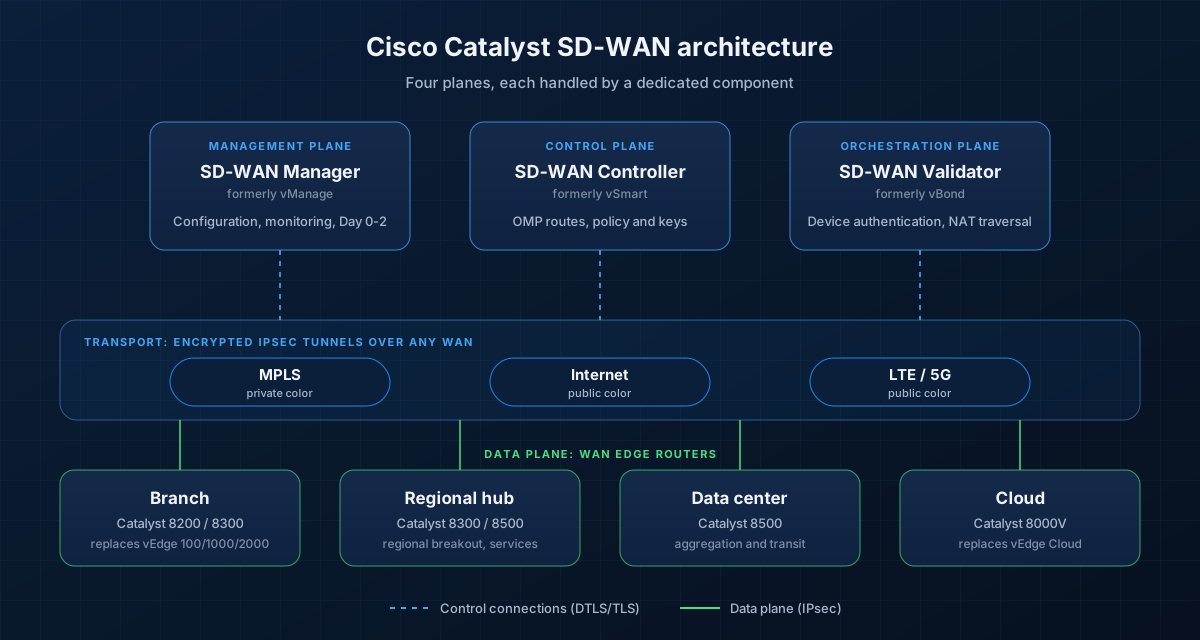 The four planes of Cisco Catalyst SD-WAN. Based on the Cisco SD-WAN Migration Guide and Catalyst SD-WAN Design Guide, redrawn with current product names.
Plan Before You Migrate
Moving from a legacy WAN to SD-WAN changes the control plane, the data plane and how the network is partitioned, so planning matters more than in a typical router refresh. Cisco's guide groups the decisions into three areas.
Controller considerations
- Hosting model: cloud-delivered by Cisco, or on-premises.
- Redundancy and scale: the solution scales horizontally, so add controllers as the network grows. Plan at least two of each for resilience.
- Firewall ports: edges and controllers use specific DTLS, TLS and IPsec ports. Make sure every firewall in the path allows them, or devices will not join the overlay.
Data center considerations
- New or existing circuits, and whether the design uses dual MPLS, hybrid MPLS and internet, or LTE.
- Topology: full mesh, hub and spoke, or a mix.
- Routing, and how traffic will flow during the migration while some sites are on SD-WAN and others are not.
- Policy requirements: application-aware routing SLAs, traffic engineering, service advertisement and QoS.
Branch and regional considerations
- Circuits, the applications and services each site depends on, and its topology.
- Whether internet traffic breaks out locally (direct internet access) or is backhauled to the data center.
- Regional breakout for shared services, and access to SaaS and IaaS.
Design Foundations
A few early design choices make every later step easier.
- System IP: a unique, persistent address for each device, similar to a router ID. Use a logical scheme so devices are easy to recognize, and use the system IP as the source for SNMP and logging.
- Site ID: every device at a site shares a site ID, and policies are applied to lists or ranges of site IDs (there are no wildcards). Cisco's guide suggests a structured nine-digit scheme: one digit for continent, one for region, four for site type and three for the site number. A new site then picks up the right policy automatically.
- Port mapping: use the same ports for the same purpose everywhere, for example internet always on the first WAN port and MPLS on the second.
- Colors: each transport tunnel gets a color. Private colors such as
mplsandprivate1build tunnels using the native underlay address; public colors such asbiz-internetandlteuse the post-NAT address. - Segmentation: VPN 0 is the transport (WAN) side, VPN 512 is out-of-band management, and VPNs 1 to 511 carry service-side (LAN) traffic. Map your existing VRFs to service VPNs to keep the same segmentation.
What has changed since the original guide
Cisco's guide builds configurations with device and feature templates and centralized policies. In current releases, Cisco recommends configuration groups and policy groups instead. A site can be managed by one model or the other, not both, so pick one approach and use it consistently. The Configuration Conversion Tool, available from SD-WAN Manager 20.12.1 and still in beta, converts existing templates and policies into the new model.
The Seven-Step Migration Sequence
Cisco recommends the same high-level sequence whether you start from a greenfield site, a brownfield legacy WAN or an IWAN network:
- Set up the Smart Account and Virtual Account. These hold the signed list of edge serial numbers that are allowed to join your overlay, and drive Plug and Play onboarding.
- Deploy the control components, in the cloud or on-premises, reachable over the internet, MPLS or both.
- Build configurations and policies in SD-WAN Manager, and test them in a lab before touching production.
- Migrate the data centers first. They act as the transit point between migrated and legacy sites.
- Migrate regional hubs and large branches that provide regional internet breakout, security or other shared services.
- Migrate the remaining branches, region by region.
- Decommission the legacy routers in the data centers, and any legacy or IWAN controllers.
After every step, confirm that both existing and new traffic flows are working as expected before moving on.
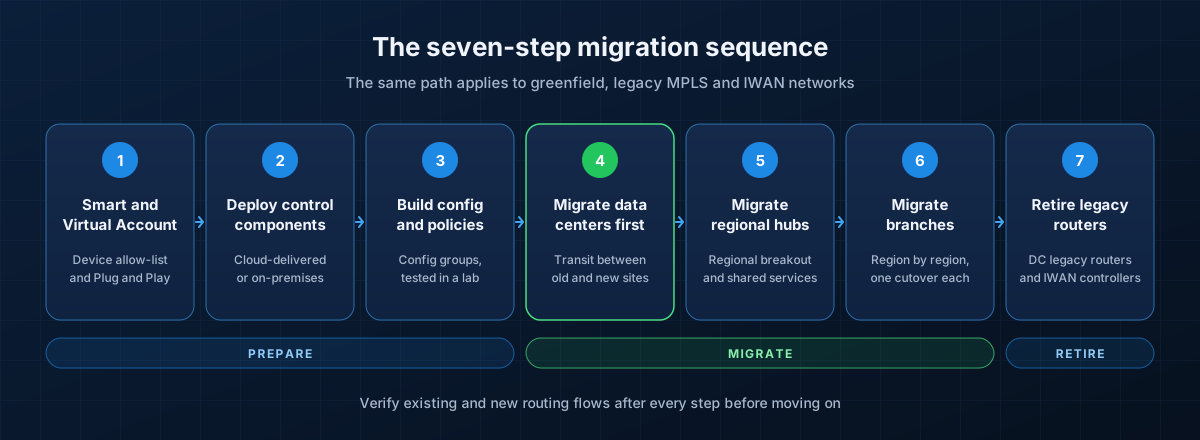 The recommended migration sequence. Based on the Cisco SD-WAN Migration Guide.
Data Center Migration
The data center goes first because branch migration is gradual. While it is under way, the data center carries traffic between SD-WAN sites and legacy sites.
- Place the SD-WAN edge routers behind the existing CE routers. The CE routers keep their MPLS and internet connections and extend them to the new edges, which also connect to the data center core. Existing routing barely changes.
- Plan for transit bandwidth. Traffic between migrated and legacy branches now passes through the data center. In very large networks, a regional site can act as the transit point instead to avoid extra latency.
- Advertise the right routes. The edges advertise data center prefixes, a default route and summary routes for legacy sites into the overlay, and advertise SD-WAN site prefixes back to the core.
- Prevent routing loops. Two edges redistributing between OMP and the LAN routing protocol can create loops. Use the same BGP AS number on both edges, configure an overlay AS, or tag routes when redistributing and filter on those tags.
- Repeat for the second data center. Watch for loops over any backdoor link between data centers, using the same techniques.
Cisco's IWAN migration guide breaks the data center cutover into eight steps: baseline the current network, pre-stage the edge, activate central policy, attach configuration, validate certificates, onboard to SD-WAN Manager, validate routing and verify operations. The baseline step matters most: record application performance, loss, latency, jitter and device health before changing anything, so you can prove the migration worked.
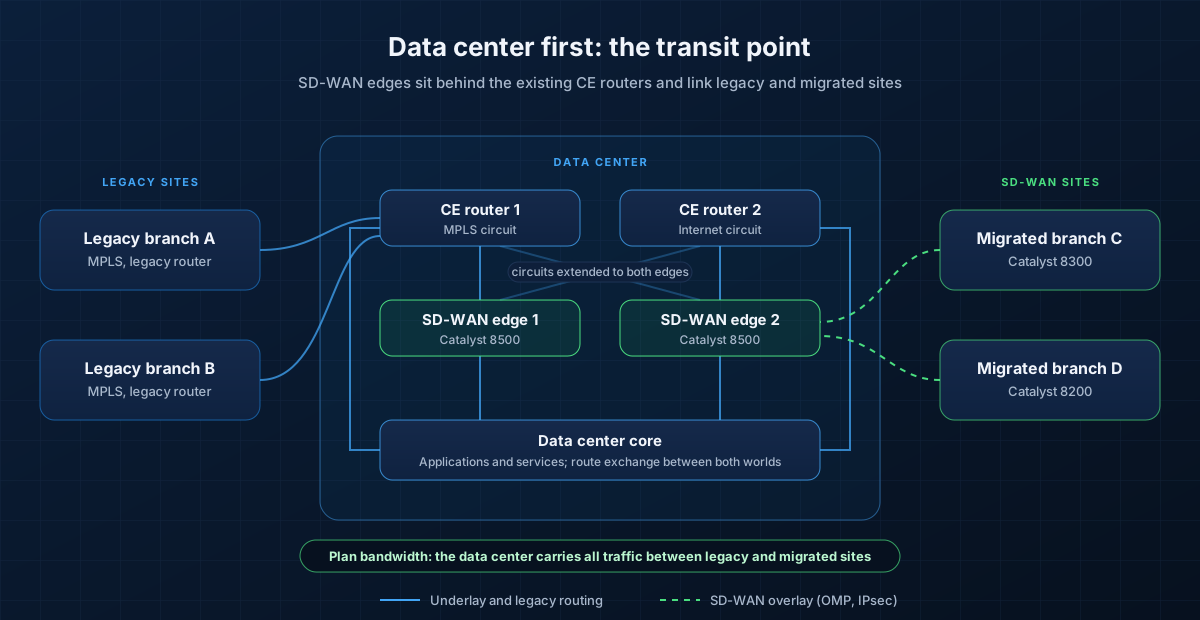 During migration the data center links both worlds. Based on the Cisco SD-WAN Migration Guide.
Branch Migration Options
Once the data center is ready, each branch moves to SD-WAN in a single cutover. Cisco's guide describes three patterns, chosen by how many routers a branch has and what it needs to keep.
Single-router branch
This pattern requires downtime, so keep the window short:
- Pre-stage the new router with the minimum configuration needed to reach the controllers: system IP, site ID, Validator address and WAN interfaces in VPN 0.
- Confirm in SD-WAN Manager that the device's serial number shows as Valid.
- Attach its configuration in SD-WAN Manager.
- Upgrade the existing router to SD-WAN mode, or connect a new Catalyst edge and move the internet circuit to it first.
- Once the edge connects to the controllers and receives its configuration, make it the LAN gateway and move the MPLS circuit across.
Inline migration (two routers)
Branches with two WAN routers can migrate with minimal downtime, one router at a time:
- Point the LAN gateway at the second router first.
- Migrate the internet-facing router first, since the controllers are usually reached over the internet. Keep it in the staging state so it connects to the controllers and learns routes without building data tunnels.
- Mark it Valid, move the LAN gateway to it, then migrate the MPLS router.
- If each router terminates one circuit, use TLOC extension so both routers can use both circuits.
- SD-WAN edges support VRRP but not HSRP, so move LAN redundancy to VRRP before you start.
Parallel migration
Here the MPLS CE router stays in place next to the new SD-WAN edge, which takes over the internet connection. This suits branches that still need direct MPLS access to legacy sites, or that have services such as WAAS or unified communications attached to the CE router. The trade-off: no transport redundancy after migration, so treat it as an interim step. Cisco does not recommend it for IWAN migrations.
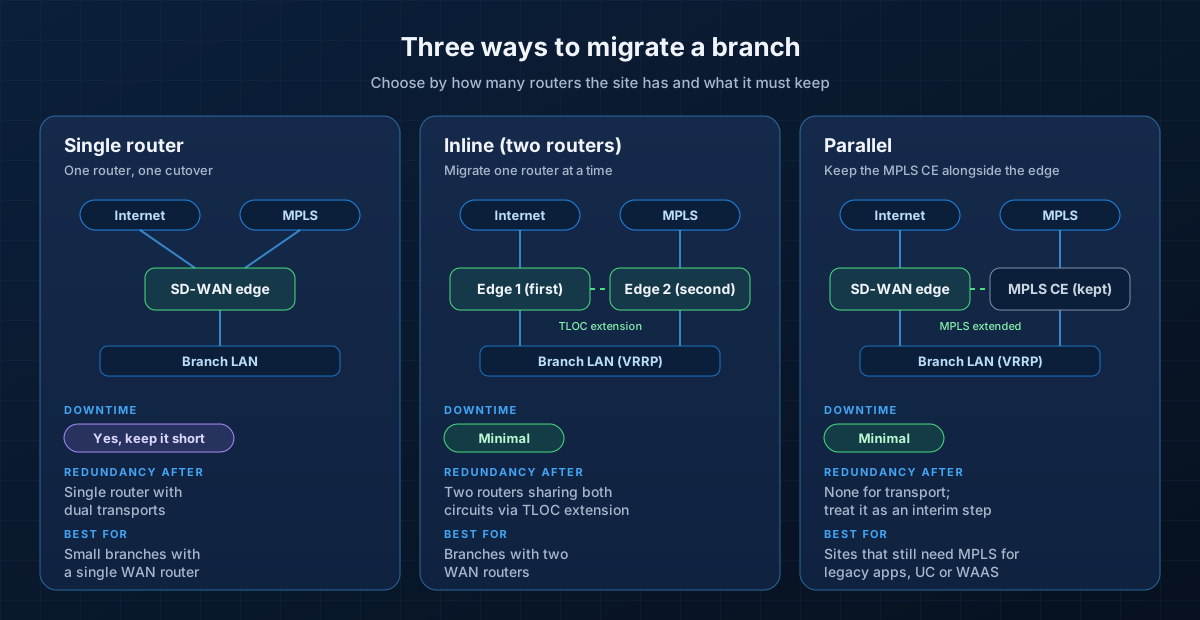 Three ways to migrate a branch. Based on the Cisco SD-WAN Migration Guide.
Moving from vEdge to Catalyst 8000
Many Cisco SD-WAN networks are migrating a second time: from Viptela-era vEdge hardware to Catalyst 8000 platforms running IOS XE in SD-WAN mode.
- Branch: Catalyst 8200 and 8300. Cisco lists the Catalyst 8300 as the replacement for vEdge 2000 routers.
- Aggregation and data center: Catalyst 8500.
- Cloud and virtual: Catalyst 8000V replaces vEdge Cloud, whose last software release is 20.9.x.
The same control components manage both families, so you can migrate site by site using the branch patterns above. vEdge and IOS XE configurations differ, so rebuild them in SD-WAN Manager (ideally as configuration groups) and test in a lab first. Prioritize sites with vEdge 100 and 1000 hardware, which is already out of support.
Adding Security: Catalyst SD-WAN and SASE
Moving branches to direct internet access means security has to move closer to the user. Catalyst SD-WAN can build automated tunnels to Cisco Secure Access, Cisco's cloud security service, from SD-WAN Manager 20.15.1 and IOS XE 17.15.1 onwards. Internet-bound traffic is then inspected by cloud-delivered secure web gateway, DNS security, CASB and zero trust access controls before it leaves the branch. Plan this alongside the migration rather than afterwards, so each branch moves straight to secure local breakout.
Per-Site Cutover Checklist
- Baseline application performance, loss, latency and jitter before the change
- Edge pre-staged, serial listed as Valid, configuration attached and tested in the lab
- Firewall rules allow control-plane and IPsec ports on every transport
- Change window, communication plan and on-site or remote hands confirmed
- Control connections and data tunnels up on every transport after cutover
- Routes correct in both directions, including to legacy sites through the data center
- Critical applications, voice and video tested end to end
- Rollback plan ready: the legacy configuration saved and the old router available until the site is signed off
Common Pitfalls
- Black-holed internet traffic. A static default route at the branch overrides the default route advertised from the data center. If the more specific routes aren't there, traffic is dropped. Use a data policy for local breakout, or advertise summary routes from the data center.
- Routing loops from redistributing between OMP and the LAN routing protocol on two data center edges.
- An unplanned site ID scheme, which makes policy hard to apply and impossible to automate.
- Blocked control-plane ports, which stop edges from joining the overlay.
- Undersized data center links, which become congested while the data center carries transit traffic between old and new sites.
- Mixing templates and configuration groups on the same site.
Conclusion
A Cisco Catalyst SD-WAN migration is less about the new routers and more about sequence and discipline: design the foundations properly, migrate the data centers first, move branches with the cutover pattern that suits each site, and verify routing after every step. With vEdge hardware reaching end of support and SASE becoming the norm, 2026 is a good time to finish the journey.
XeroStop plans and delivers SD-WAN migrations for enterprises across MPLS, IWAN and vEdge networks. Explore our network solutions and intelligent network automation, read about high-availability voice over the WAN, or talk to our team about your migration.
Sources
- Cisco: Cisco SD-WAN Migration Guide (PDF)
- Cisco: IWAN to Cisco SD-WAN Migration Guide (PDF)
- Cisco: Catalyst SD-WAN Design Guide (PDF)
- Cisco: Catalyst SD-WAN Control Components Release Notes 20.12 (component renaming)
- Cisco: End-of-life notice for vEdge 100 and vEdge 1000
- Cisco: End-of-life notice for vEdge 2000 and vEdge 5000
- Cisco: End-of-life notice for vEdge Cloud
- Cisco: Configuration Conversion Tool
- Cisco: Configure Secure Access with SD-WAN automated tunnels
- TeleGeography: Enterprise Network Trends and Strategy, WAN Manager Survey
- Gartner: Market Guide for SD-WAN (2026)