Introduction
For most of my career, data center security meant a big pair of firewalls at the edge and a mostly flat network behind them. That model made sense when applications were monoliths and traffic flowed in and out through one front door. It does not survive contact with a modern attacker.
The numbers from 2026 make the point. Verizon's 2026 Data Breach Investigations Report found that exploitation of vulnerabilities is now the most common way into an organization, at 31% of breaches, overtaking stolen credentials for the first time in the report's 19 years. Ransomware appeared in 48% of breaches. And only 26% of critical vulnerabilities in CISA's Known Exploited Vulnerabilities catalog were fully remediated, with a median of 43 days to close them. In other words: assume something inside your data center is exploitable today.
When that foothold turns into a breach, it is expensive. IBM's Cost of a Data Breach Report 2026 puts the global average at a record USD 4.99 million, up 12% in a year, and USD 11.5 million in the United States. The mean time to identify and contain a breach rose to 247 days. That is eight months in which an attacker can explore whatever your network allows them to reach.
This is why data center security has moved inward. The goal is no longer only to keep attackers out, but to make sure that one compromised server, container or credential cannot become a compromised data center. This guide covers how to get there in practice: segmentation, firewall design, next-generation firewalls, zero trust, DDoS defense and monitoring.
North-South vs East-West: Where the Risk Has Moved
Two traffic directions define data center security design:
- North-south traffic enters or leaves the data center: users reaching applications, partners calling APIs, servers reaching the internet. It crosses the perimeter, so it is usually inspected.
- East-west traffic stays inside: web servers calling application servers, applications querying databases, backup jobs, replication, monitoring, vMotion and Kubernetes pod-to-pod traffic. In a virtualized or containerized data center, this is the large majority of all traffic.
The problem is simple. In a traditional design, east-west traffic never crosses a firewall. Once an attacker controls a single web server, they can scan, authenticate against and exploit everything in the same VLAN, VRF or flat fabric. Lateral movement is how a single unpatched appliance becomes an enterprise-wide ransomware event.
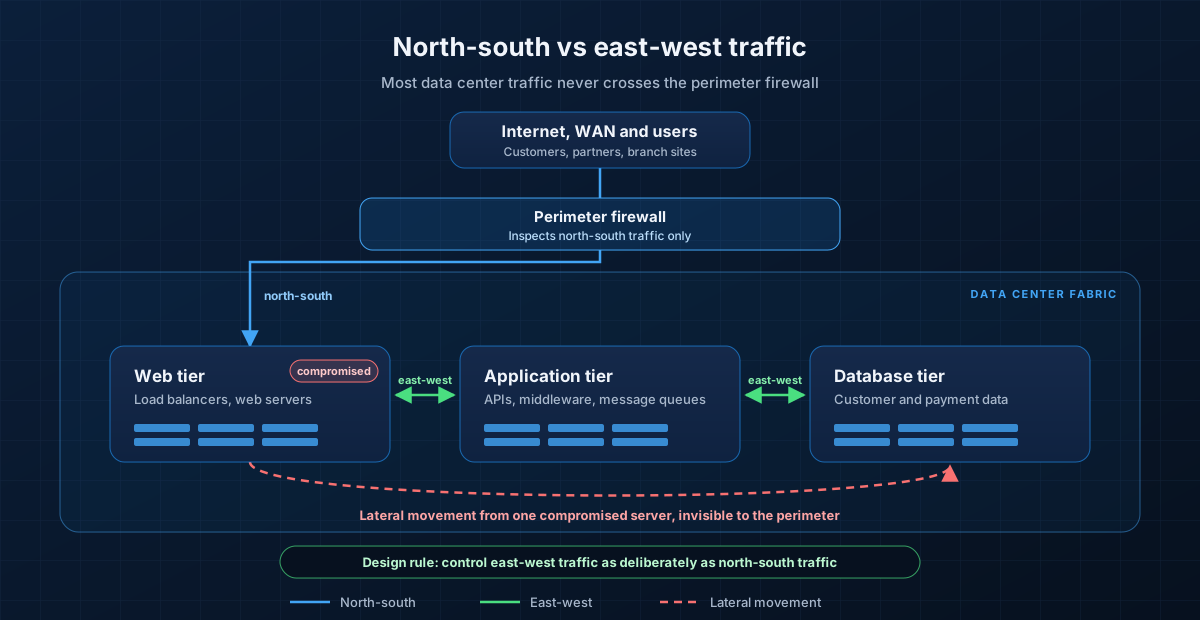 The perimeter only sees north-south traffic. Lateral movement between tiers happens entirely inside the fabric unless you deliberately control east-west traffic.
The design principle that follows is equally simple: control east-west traffic as deliberately as north-south traffic. Everything else in this guide is a way of doing that at scale without breaking applications.
Macro-Segmentation: VLANs, VRFs and Security Zones
Segmentation works in layers. The first and coarsest layer separates environments and trust levels from each other.
VLANs are not a security boundary
VLANs separate broadcast domains. They are useful, but on their own they are not a security control: anything routed between two VLANs on the same switch or fabric gateway is allowed unless you add an access list or a firewall. I still see data centers where "segmented" means fifty VLANs that all route freely through the same distributed gateway.
VRFs create real routing isolation
A VRF (virtual routing and forwarding instance) gives each segment its own routing table. Hosts in VRF PROD simply have no route to hosts in VRF DEV. The only way between them is a point you choose, and that point should be a stateful firewall.
In a modern EVPN-VXLAN spine-leaf fabric, each VRF maps to a Layer 3 VNI so the isolation extends across every leaf. On Cisco NX-OS, a tenant VRF looks like this:
vrf context PROD
  vni 50001
  rd auto
  address-family ipv4 unicast
    route-target both auto
    route-target both auto evpn

vlan 2501
  vn-segment 50001

interface Vlan2501
  no shutdown
  vrf member PROD
  ip forward

interface nve1
  member vni 50001 associate-vrf
Arista EOS and Juniper fabrics use the same building blocks with different syntax. What matters is the design: one VRF per trust zone, and inter-VRF traffic forced through a firewall rather than leaked with route-target imports.
Define a small number of zones
Most enterprise data centers I work with end up with between five and ten macro zones, for example:
- Production and non-production (development, test, UAT)
- Regulated zones, such as the PCI cardholder data environment or systems holding health records
- DMZ for internet-facing services
- Shared services: DNS, NTP, directory services, patching, backup
- Management: hypervisor managers, out-of-band interfaces, storage controllers, PAM and jump hosts
The management zone deserves special attention. Ransomware operators target hypervisor managers and backup consoles because controlling them means controlling everything. Management interfaces should never be reachable from production VRFs, and administrator access should flow only through hardened jump hosts or a privileged access management (PAM) platform with phishing-resistant MFA.
Micro-Segmentation: Policy on Every Workload
Macro zones stop a breach in development from reaching production. They do nothing about a compromised web server attacking the database in the same production VRF. That is the job of the next two layers.
- Application segmentation ring-fences each application, so a breach in one application cannot reach the others in the same zone.
- Micro-segmentation applies policy to each individual workload: every virtual machine, container or bare-metal server gets its own allow list, enforced as close to the workload as possible.
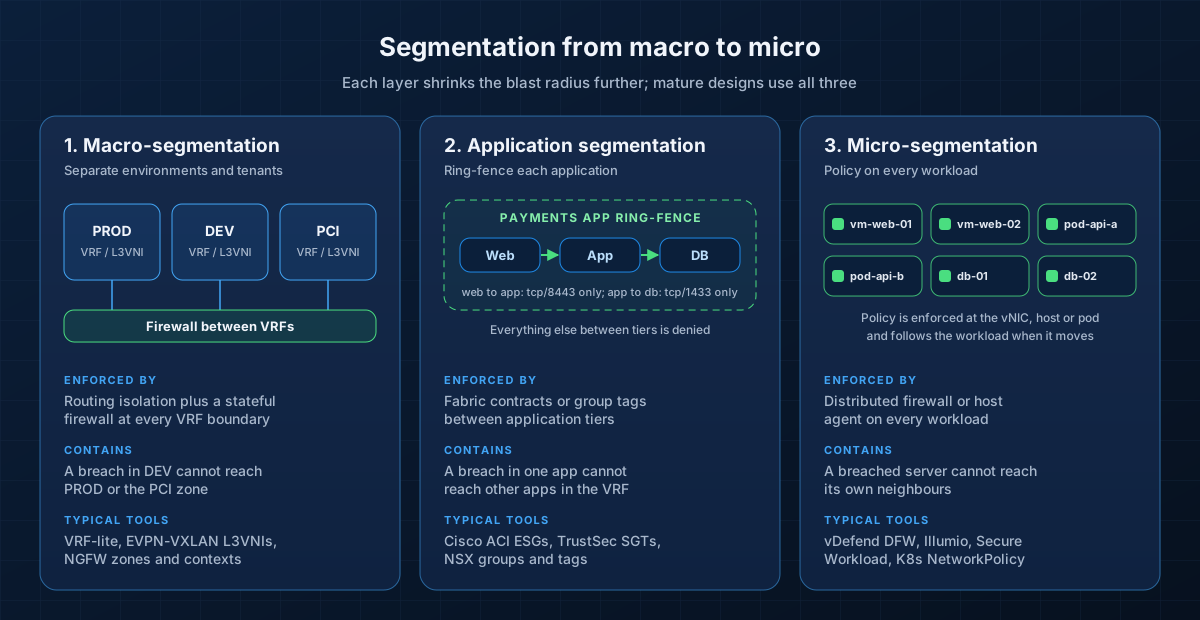 Each layer shrinks the blast radius further. Mature designs use all three, with coarse controls in the network and fine-grained controls at the workload.
Enforcement options
- Fabric-based policy. Cisco ACI groups endpoints into endpoint security groups (ESGs) and only allows traffic that matches a contract between them. Enforcement happens in leaf switch hardware, at line rate.
- Hypervisor-based firewalls. VMware's vDefend Distributed Firewall (the NSX distributed firewall, now under Broadcom) runs on every VM's virtual NIC, inspects traffic at Layer 2 to Layer 7, and keeps its policy and state attached to the VM during vMotion.
- Host-agent platforms. Illumio, Cisco Secure Workload (formerly Tetration) and similar tools program the host's own firewall (iptables, nftables, Windows Filtering Platform) from a central policy, which covers bare-metal and multi-cloud workloads equally.
- Kubernetes NetworkPolicy. Inside a cluster, pods can talk to every other pod by default. A NetworkPolicy, enforced by a CNI that supports it (such as Calico, Cilium or Antrea), changes that.
For a payments namespace, start with a default deny and then allow only what the application needs:
apiVersion: networking.k8s.io/v1
kind: NetworkPolicy
metadata:
  name: default-deny-ingress
  namespace: payments
spec:
  podSelector: {}
  policyTypes:
    - Ingress
---
apiVersion: networking.k8s.io/v1
kind: NetworkPolicy
metadata:
  name: api-allow-from-web
  namespace: payments
spec:
  podSelector:
    matchLabels:
      app: payments-api
  policyTypes:
    - Ingress
  ingress:
    - from:
        - podSelector:
            matchLabels:
              app: payments-web
      ports:
        - protocol: TCP
          port: 8443
How to roll it out without breaking production
Micro-segmentation projects rarely fail on technology. They fail because nobody knows what the applications actually talk to. The approach that works:
- Map dependencies first. Collect flow data for at least one full business cycle, including month-end and quarter-end jobs, and build an application dependency map. Every major platform above has a discovery or recommendation mode for this.
- Label everything. Policy should be written against labels such as application, environment, tier and data classification, not IP addresses. Labels survive re-addressing, autoscaling and migration; IP-based rules do not.
- Ring-fence before you micro-segment. Start by allowing everything inside an application and controlling traffic between applications. That alone removes most lateral movement paths.
- Run in monitor mode, then enforce. Log what would have been blocked for two to four weeks, fix the gaps, then switch to enforcement application by application.
- Treat policy as code. Store rules in version control, review changes like code and deploy through the platform's API. Manual rule changes in a GUI do not scale to thousands of workloads.
Data Center Firewall Design: Transparent, Routed and Service Insertion
Wherever a stateful firewall sits in the data path, it is deployed in one of three ways.
Transparent (Layer 2) mode
A transparent firewall bridges two halves of the same subnet. Hosts and routers keep their addresses and gateways, which makes it the least disruptive way to add inspection to an existing segment.
On Cisco ASA (and Secure Firewall ASA), member interfaces join a bridge group, and the IP address goes on the bridge virtual interface (BVI), not on the member interfaces:
firewall transparent
!
interface GigabitEthernet0/0
 nameif outside
 security-level 0
 bridge-group 1
 no shutdown
!
interface GigabitEthernet0/1
 nameif inside
 security-level 100
 bridge-group 1
 no shutdown
!
interface BVI1
 ip address 10.1.3.1 255.255.255.0 standby 10.1.3.2
Three details catch people out. Changing the firewall mode clears the running configuration, so do it first. The BVI address is required before the ASA will pass IPv4 traffic, even though it is only used for management and traffic the firewall originates. And transparent mode does not run dynamic routing, so plan carefully for spanning tree BPDUs, ARP inspection and failover behavior.
Routed (Layer 3) mode
In routed mode, the firewall is the default gateway for the segments behind it, with one interface or subinterface per zone. This is the natural choice at VRF, tenant and DMZ boundaries, because it gives you clean zone separation plus routing, NAT and VPN features.
The trap is using routed firewalls for all east-west traffic. If every web-to-database flow has to hairpin through a central firewall pair, that pair becomes your most expensive bottleneck and your riskiest change window.
Service insertion
The third option keeps the firewall out of the default path and lets the fabric steer only the traffic that needs inspection. In Cisco ACI, a service graph with policy-based redirect (PBR) redirects flows that match a contract between two ESGs to a firewall, often deployed in one-arm mode. VMware vDefend and most EVPN fabrics offer equivalent redirection features.
Service insertion scales well, but it has one golden rule: both directions of a flow must reach the same firewall. Asymmetric paths break stateful inspection and produce intermittent, painful-to-debug drops. Use symmetric hashing, keep firewall clusters in sync, and configure health tracking so the fabric stops redirecting to a failed firewall.
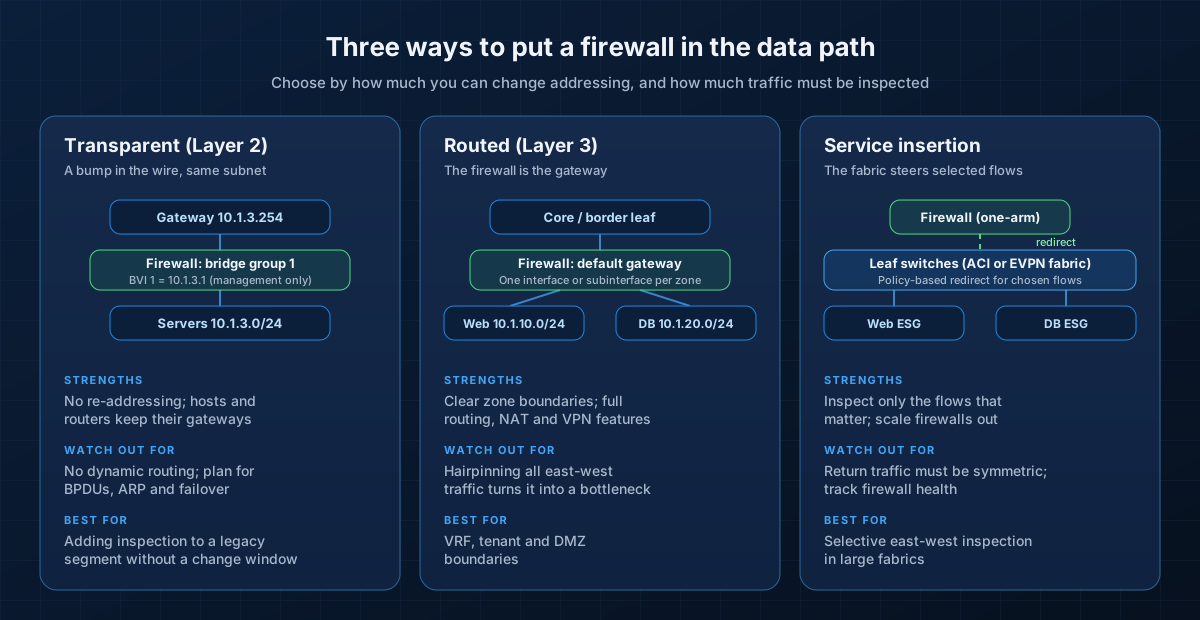 Most data centers use all three: routed firewalls at zone boundaries, service insertion for selected east-west flows, and transparent mode where re-addressing is not an option.
Next-Generation Firewalls in the Data Center
A next-generation firewall (NGFW) adds application identification, user identity, intrusion prevention, malware and URL filtering, and TLS decryption to stateful filtering. In the data center, the three platforms I see most often are:
- Palo Alto Networks. Policy is built on App-ID (application), User-ID (identity) and Content-ID (threat inspection). The PA-7500 chassis is rated at up to 1.5 Tbps of App-ID throughput with 400G interfaces, and the PA-5500 series targets the enterprise data center edge. Firewalls are managed through Panorama or the cloud-based Strata Cloud Manager, and the PA-7500 supports two-node NGFW clustering with sub-second failover.
- Fortinet FortiGate. The data center range (FortiGate 3000G, 4000F and 7000F series, among others) uses Fortinet's NP7 network processor to accelerate session setup, VXLAN termination and large "elephant" flows, and CP9 or CP10 content processors for TLS and IPS. Virtual domains (VDOMs) suit multi-tenant designs, with central management in FortiManager.
- Cisco Secure Firewall (formerly Firepower). The 3100, 4200 and 6100 series run Threat Defense (with the Snort 3 inspection engine) or ASA software. The 3100 and 4200 support clustering of up to 16 nodes. Management is through Secure Firewall Management Center, on-premises or cloud-delivered within Security Cloud Control.
All three are mature. The right choice depends on your environment, not on a feature checklist. When I evaluate data center firewalls, these criteria carry the most weight:
- Threat-protection throughput, not firewall throughput. Datasheet headline numbers use large packets with inspection turned off. Fortinet's own ordering guide, for example, lists the FortiGate 3000G at 397 Gbps of firewall throughput but 80 Gbps of threat-protection throughput. Size on the number with your real feature set enabled.
- Connections per second and concurrent sessions. East-west traffic generates enormous numbers of short connections. Session setup rate is often the first limit you hit.
- Decryption capacity. If you plan to inspect TLS 1.3 traffic between tiers, test it with your traffic mix. Decryption commonly removes a large share of usable throughput.
- Clustering and failover. Look at how state is synchronized, how many nodes can share load and what failover time real applications experience.
- Fabric and automation integration. Native integration with ACI, vDefend, Kubernetes and public cloud, plus complete APIs and Terraform or Ansible support, matters more over five years than any single feature.
- Operations. Your team's existing skills and the quality of the management platform decide whether policy stays clean or decays.
Zero Trust for Data Centers: Never Trust, Always Verify
Zero trust is the strategy that ties all of this together. NIST SP 800-207 defines it as removing implicit trust based on network location: being inside the data center, or inside a particular VLAN, should grant nothing by itself. Every request is authenticated and authorized, per session, based on identity and context.
NIST describes a simple logical model:
- A policy engine decides whether a subject (a user, service or workload) may access a resource, using inputs such as identity, device and workload posture, threat intelligence and activity logs.
- A policy administrator carries out that decision, setting up or tearing down the session.
- A policy enforcement point (PEP) sits in the data path and allows or blocks the connection. In a data center, PEPs are your NGFWs, distributed firewalls, fabric contracts, ZTNA gateways and service mesh proxies.
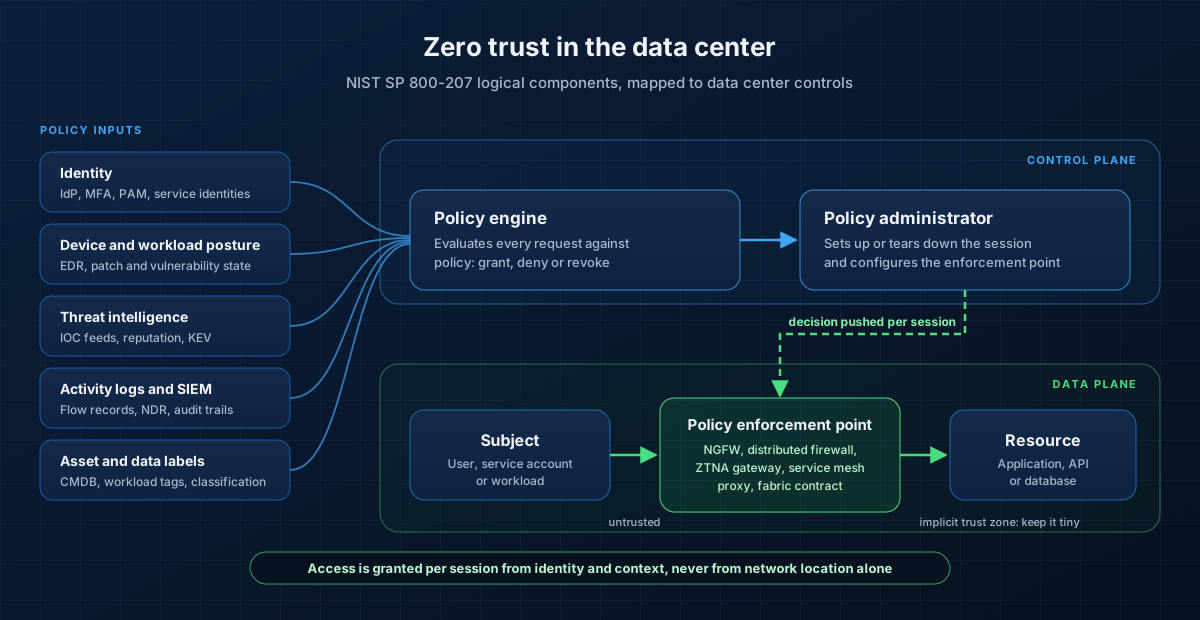 In NIST's model, implicit trust exists only in the small zone behind each enforcement point. Micro-segmentation is how you keep that zone tiny.
Three references are worth knowing. NIST SP 800-207A applies the model to cloud-native applications, with service identities and service mesh enforcement. NIST SP 1800-35, finalized in June 2025, documents 19 working zero trust implementations built with 24 vendors. And CISA's Zero Trust Maturity Model v2.0 gives a practical scale (traditional, initial, advanced, optimal) across five pillars: identity, devices, networks, applications and workloads, and data.
In data center terms, zero trust translates into concrete controls:
- Workload identity, not IP identity. Write policy against labels, security group tags (such as Cisco TrustSec SGTs) or cryptographic service identities, so rules follow workloads instead of addresses.
- Mutual TLS between services. A service mesh such as Istio or Linkerd authenticates every service-to-service call and encrypts it in transit.
- Least-privilege administration. Just-in-time privileged access through PAM, phishing-resistant MFA for every administrator, and no standing access to hypervisor, storage or backup consoles.
- Continuous verification. Feed EDR, vulnerability and threat signals into policy, so a workload that suddenly shows indicators of compromise can be quarantined automatically.
Zero trust is a journey, not a product. Do not let a vendor convince you otherwise.
DDoS Protection: Scrubbing, RTBH, Flowspec and CoPP
Availability is part of security, and DDoS attacks have changed scale. Cloudflare mitigated a record 31.4 Tbps attack in late 2025 that lasted just 35 seconds, and in the first half of 2026 it mitigated 935 network-layer attacks above 1 Tbps. Most attacks are still small and short (over 90% end in under ten minutes), but as Cloudflare notes, a 100 Gbps attack can knock most unprotected data centers offline. No enterprise data center has the transit capacity to absorb that alone, and no human can react within 35 seconds.
Effective DDoS defense is layered, with each attack class stopped where there is capacity to absorb it.
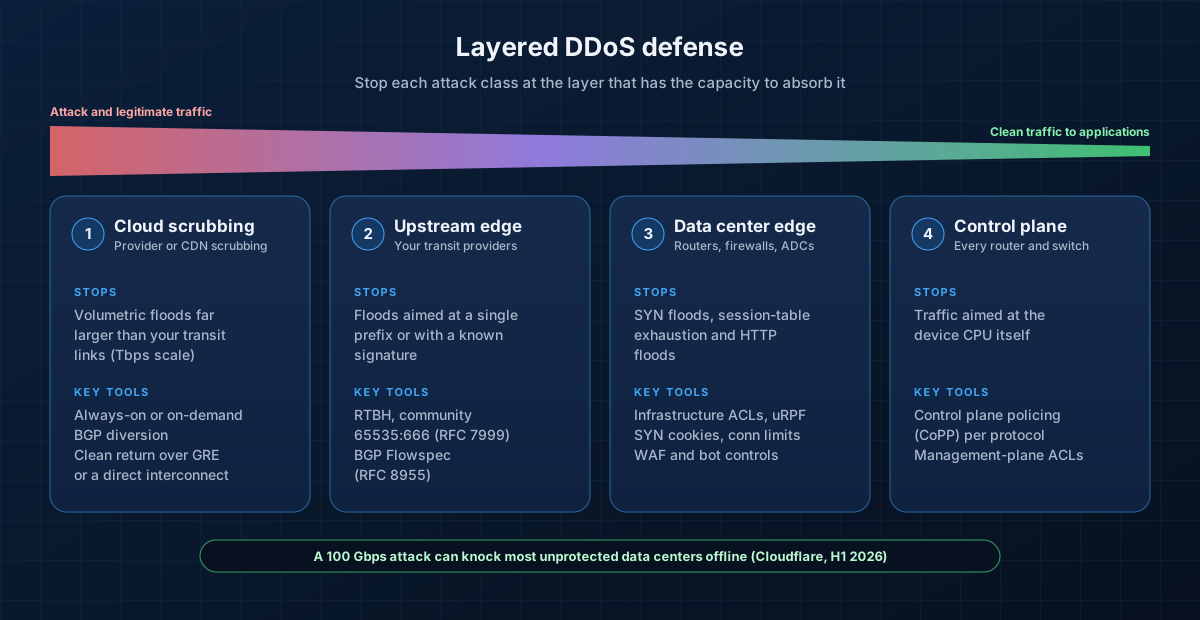 Volumetric floods must be stopped upstream; your own edge handles state exhaustion and application floods; CoPP protects the devices themselves.
1. Cloud scrubbing
A scrubbing provider or CDN absorbs volumetric floods in its own network. Traffic is diverted by BGP (announcing your prefixes from the provider), and clean traffic is returned over GRE tunnels or a direct interconnect. Choose always-on protection for critical internet-facing services. On-demand diversion is cheaper but takes time to activate, and many attacks are over before it does.
2. Upstream: RTBH and Flowspec
- Remotely triggered black hole (RTBH) routing asks your transit providers to drop all traffic to a targeted address. RFC 7999 standardizes the BLACKHOLE community, 65535:666. RTBH effectively completes the attack against that one address, so use it to sacrifice a single IP to save the rest of the link.
- BGP Flowspec (RFC 8955 for IPv4, RFC 8956 for IPv6) is more precise. It distributes match-and-action rules, such as "rate-limit UDP from source port 123 to this prefix", so you can drop the attack traffic and keep the service running.
A customer-triggered RTBH announcement on Cisco IOS XE looks like this (your provider documents which communities it accepts):
ip route 203.0.113.45 255.255.255.255 Null0 tag 666
!
route-map RTBH-TRIGGER permit 10
 match tag 666
 set community 65535:666 no-export
!
router bgp 64500
 address-family ipv4 unicast
  redistribute static route-map RTBH-TRIGGER
  neighbor 198.51.100.1 send-community
3. The data center edge
Your own edge handles what gets past the upstream layers: SYN floods, session-table exhaustion and application-layer floods. Infrastructure ACLs and unicast reverse path forwarding (uRPF) drop spoofed and unwanted traffic before it reaches stateful devices. SYN cookies and connection limits on firewalls and load balancers protect session tables, and a WAF with bot controls handles HTTP floods. Remember that a stateful firewall is itself a DDoS target: size its session table for attack conditions, not normal traffic.
4. Control plane policing
Finally, protect the routers and switches themselves. Control plane policing (CoPP) rate-limits traffic destined to the device CPU, so a flood of ICMP or BGP packets cannot take down your routing. Platforms such as Cisco Nexus (with predefined CoPP profiles) and Catalyst 9000 (with its system CPU policy) ship with defaults you should review and tune. On routers, you build CoPP with the Modular QoS CLI:
ip access-list extended COPP-BGP
 permit tcp host 198.51.100.1 any eq bgp
 permit tcp host 198.51.100.1 eq bgp any
ip access-list extended COPP-MGMT
 permit tcp 10.255.0.0 0.0.255.255 any eq 22
ip access-list extended COPP-ICMP
 permit icmp any any
!
class-map match-all COPP-BGP
 match access-group name COPP-BGP
class-map match-all COPP-MGMT
 match access-group name COPP-MGMT
class-map match-all COPP-ICMP
 match access-group name COPP-ICMP
!
policy-map COPP-POLICY
 class COPP-BGP
  police cir 2000000 conform-action transmit exceed-action transmit
 class COPP-MGMT
  police cir 1000000 conform-action transmit exceed-action drop
 class COPP-ICMP
  police cir 64000 conform-action transmit exceed-action drop
 class class-default
  police cir 256000 conform-action transmit exceed-action drop
!
control-plane
 service-policy input COPP-POLICY
Note that the BGP class transmits even when it exceeds its rate. Dropping your own routing protocol is a classic way to turn a DDoS into a self-inflicted outage, so baseline real control plane traffic before you set the numbers.
Security Monitoring: Flow Analysis, IDS/IPS and Threat Detection
Segmentation reduces what an attacker can reach. Monitoring is how you notice when they try. Remember IBM's 247 days: most of that time is spent undetected.
- Flow telemetry. Export NetFlow v9 or IPFIX (RFC 7011) from fabric switches and firewalls, or sFlow where that is what the hardware supports. Flow records are cheap, cover all east-west traffic and remain useful even when payloads are encrypted.
- Network detection and response (NDR). Platforms such as Cisco Secure Network Analytics (formerly Stealthwatch) baseline normal behavior and flag anomalies: new internal scanning, unusual SMB or RDP between servers, beaconing to command-and-control and large internal data transfers that often precede exfiltration.
- IDS/IPS. Signature and behavioral inspection with engines such as Snort 3 and Suricata, either built into your NGFW or fed from SPAN, ERSPAN or a network packet broker. Tune signatures to your environment; an untuned IPS in blocking mode generates outages and alert fatigue.
- Decryption reality. With TLS 1.3 everywhere, passive inspection sees less and less. Combine inline decryption at chosen points with endpoint telemetry from EDR, which sees the traffic before encryption.
- SIEM and correlation. Centralize firewall, fabric, NDR, EDR, identity and hypervisor logs in a SIEM, and write detections for the lateral movement chain, not just single events. A new remote admin session to a hypervisor manager, followed by snapshot deletion, should page someone immediately.
IBM's 2026 report found that organizations using security AI and automation extensively cut their breach lifecycle by 65 days and their costs by USD 1.93 million on average. Automation is no longer optional for data center monitoring at scale.
Compliance: Segmentation and PCI DSS
Segmentation also has a compliance dividend. PCI DSS v4.0.1 does not require segmentation, but without it your entire network is in scope for assessment. When you use segmentation to isolate the cardholder data environment (CDE), you must prove it works:
- Requirement 11.4.5: penetration test all segmentation controls at least every 12 months and after any change to segmentation controls or methods.
- Requirement 11.4.6: service providers must do the same at least every six months.
- Multi-tenant service providers must also test the separation between customer environments under Appendix A1.
The testing must confirm that out-of-scope systems genuinely cannot reach the CDE, and it must be performed by a qualified, organizationally independent tester. Healthcare, financial services and critical infrastructure regulators increasingly expect similar evidence that segmentation is enforced and tested, not just drawn on a diagram.
A 90-Day Roadmap
You do not need a three-year program to make meaningful progress. This sequence delivers the most risk reduction first.
Days 0 to 30: see and separate
- Inventory zones, VRFs, firewalls and inter-zone rules. Identify every "any-any" rule and every path into the management network.
- Isolate management: hypervisor, storage, backup and out-of-band interfaces in a dedicated zone, reachable only through PAM or jump hosts with phishing-resistant MFA.
- Turn on flow telemetry across the fabric and send it to your NDR or SIEM.
- Review DDoS readiness: confirm your scrubbing contract, RTBH and Flowspec support with each transit provider, and audit CoPP on edge routers.
Days 31 to 60: map and ring-fence
- Build application dependency maps for your top ten business-critical applications.
- Define a labeling scheme (application, environment, tier, data classification) and apply it.
- Ring-fence the crown jewels first: payment systems, identity infrastructure, backup and databases with regulated data. Run new policy in monitor mode.
Days 61 to 90: enforce and verify
- Move ring-fence policies to enforcement, application by application, with rollback plans.
- Replace any remaining east-west hairpin designs that overload central firewalls with service insertion or distributed enforcement.
- Write SIEM detections for lateral movement and hypervisor tampering, and rehearse them in a tabletop exercise.
- Commission an independent segmentation penetration test.
Common Pitfalls
- Calling VLANs segmentation. If inter-VLAN routing is open, you have a flat network with extra steps.
- IP-based micro-segmentation rules. They rot the moment workloads autoscale or move. Use labels and groups.
- Enforcing before mapping. Blocking traffic you did not know existed is how micro-segmentation projects get cancelled.
- Asymmetric service insertion. Return traffic that bypasses the firewall causes intermittent drops that take weeks to diagnose.
- Sizing firewalls on datasheet headline numbers. Size on threat-protection throughput and connection rate with your real features enabled.
- A reachable management plane. One flat path to vCenter, ESXi or the backup console undoes every other control.
- Untested segmentation. If nobody has tried to cross a boundary, you do not know that it holds.
Quick Checklist
- Macro zones defined, with every inter-zone path through a stateful firewall
- Management plane isolated and reachable only through PAM with phishing-resistant MFA
- Application dependency maps for critical applications, with labels applied
- Crown-jewel applications ring-fenced and enforced
- Micro-segmentation rolling out with policy as code
- Firewalls sized on threat-protection throughput, clustered and integrated with the fabric
- Zero trust roadmap aligned to NIST SP 800-207 and the CISA maturity model
- Always-on scrubbing for critical services, RTBH and Flowspec agreed with providers, CoPP tuned
- Flow telemetry, NDR and SIEM detections for lateral movement in place
- Segmentation penetration tested on the PCI DSS schedule
Conclusion
The perimeter firewall is still necessary, but it is no longer where data centers are won or lost. Attackers in 2026 exploit a vulnerability, land on one system and move sideways. The organizations that contain those breaches have done the unglamorous work: real zones with firewalls between them, applications ring-fenced, workloads micro-segmented by identity, management planes locked down, DDoS defenses layered and east-west traffic watched as closely as the internet edge.
None of this requires ripping out your data center. It requires a clear architecture, good visibility and a disciplined rollout, one application at a time.
XeroStop designs, deploys and operates secure data center infrastructure, from EVPN-VXLAN fabrics and NGFW clusters to micro-segmentation and zero trust programs. Explore our secure enterprise datacenter solution, our datacenter and security services, or read our guide to migrating to Cisco Catalyst SD-WAN. When you are ready, talk to our team about your data center security architecture.
Sources
- IBM: Cost of a Data Breach Report 2026
- Verizon: 2026 Data Breach Investigations Report
- Cloudflare: DDoS Threat Report H1 2026
- Cloudflare: 2025 Q4 DDoS threat report (31.4 Tbps record)
- NIST SP 800-207: Zero Trust Architecture
- NIST SP 800-207A: Zero Trust Architecture Model for Access Control in Cloud-Native Applications
- NIST SP 1800-35: Implementing a Zero Trust Architecture
- CISA: Zero Trust Maturity Model v2.0
- PCI Security Standards Council: PCI DSS v4.0.1 document library
- RFC 7999: BLACKHOLE Community
- RFC 8955: Dissemination of Flow Specification Rules
- RFC 7011: IPFIX Protocol Specification
- Cisco: Secure Firewall ASA transparent and routed mode interfaces
- Cisco: ACI Endpoint Security Group design guide
- Cisco: Network Security ordering guide (Secure Firewall platforms and management)
- Broadcom: VMware vDefend Distributed Firewall
- Palo Alto Networks: Next-generation firewall hardware
- Palo Alto Networks: NGFW clustering
- Fortinet: Data center firewall ordering guide
- Kubernetes: Network Policies