
Xero Forwarder
Intelligent, schedule- and rule-based call forwarding automation for Cisco CUCM.
The right call, to the right person, at the right time.
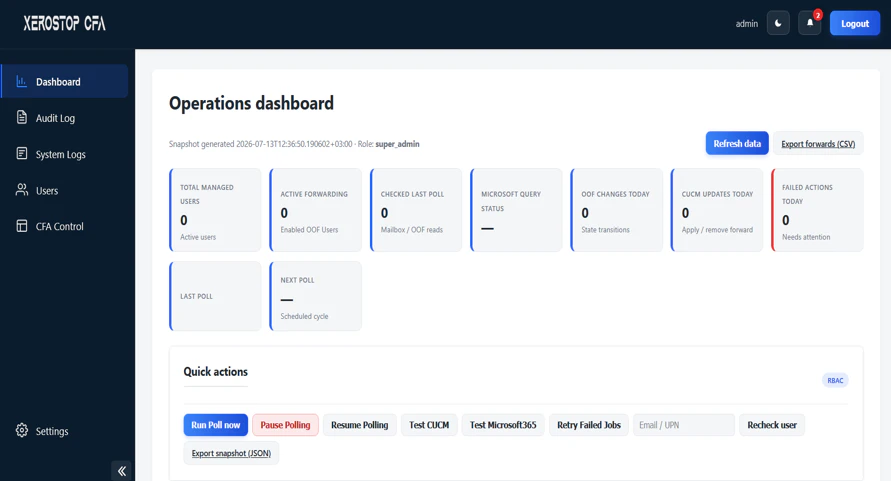
What Is Xero Forwarder?
Xero Forwarder automates call forwarding on Cisco CUCM based on schedules, holidays, and business rules, so after-hours and on-call routing changes happen without manual phone configuration.
Teams manage forwarding from a simple web portal, and every change is logged for full visibility.
Why Teams Choose Xero Forwarder
Scheduled Forwarding
Forward lines automatically by time of day, day of week, or shift.
Holiday Calendars
Apply holiday routing across sites with shared calendars.
On-Call Rotation
Route support lines to whoever is on call this week.
Self-Service Portal
Users and supervisors change forwarding without IT tickets.
Bulk Changes
Update forwarding on many lines at once during emergencies.
Audit Trail
Every forwarding change is logged with who, when, and what.
Built-In Modules
Everything you need, organized into focused modules.
Rules & Schedules
Define when and where calls go.
- Time-based and calendar-based rules
- Per-line and per-group schedules
- Holiday and exception handling
- Rule priority and overrides
Simple From Start to Finish
- 1
Define Rules
Administrators set schedules, holidays, and on-call rotations.
- 2
Evaluate
Xero Forwarder continuously checks which rules are active.
- 3
Apply
Forwarding is updated on CUCM through its administrative API.
- 4
Log
Each change is recorded and visible in the portal.
Supported Platforms
Xero Forwarder integrates with the platforms you already run.
 Cisco CUCMCisco AXL API
 Active Directory

Interested in Xero Forwarder?
Contact our team for a demo, pricing, or a technical walkthrough.