Introduction
For years, the inbox was the front door for attackers. In 2026, that door has moved. Microsoft Teams, Webex, Zoom and enterprise voice platforms are now where employees trust each other the most, and that trust is exactly what attackers exploit.
The shift is visible in the data. Microsoft's 2026 Digital Defense Report found that the weekly volume of confirmed malicious voice phishing over cross-tenant Teams calls rose 502% year over year, and that over 90% of attackers who use Teams now include voice calls in their attacks. Unit 42 reports that collaboration tools accounted for 42% of all phishing alerts in the first four months of 2026, up from 30% the period before.
At the same time, AI has made impersonation cheap. In a Gartner survey published in September 2026, 41% of CISOs reported at least one deepfake social engineering incident on an employee audio call in the previous 12 months, and 36% on a video call.
Securing unified communications (UC) in 2026 is therefore no longer just about encrypting calls and patching phones. It is about controlling who can reach your people, verifying that the person on the other end is real, and governing the growing volume of recordings, transcripts and AI summaries that every meeting now produces.
The 2026 UC Threat Landscape
Help-desk impersonation over Teams
The most common UC attack of 2026 needs no exploit at all. An attacker creates or compromises an external Microsoft 365 tenant, often a free trial, names it something like "IT Support", and sends a chat to employees. A voice call follows. The caller talks the victim into launching Quick Assist or a remote monitoring and management (RMM) tool, then uses that session to steal credentials, move laterally and exfiltrate data.
Unit 42's "Spring Ring" investigation tracked this pattern against more than 150 employees at over ten organizations between January and April 2026, with successful calls lasting 10 to 15 minutes. Microsoft has published several incident write-ups in 2026 describing the same playbook ending in enterprise-wide access and data theft.
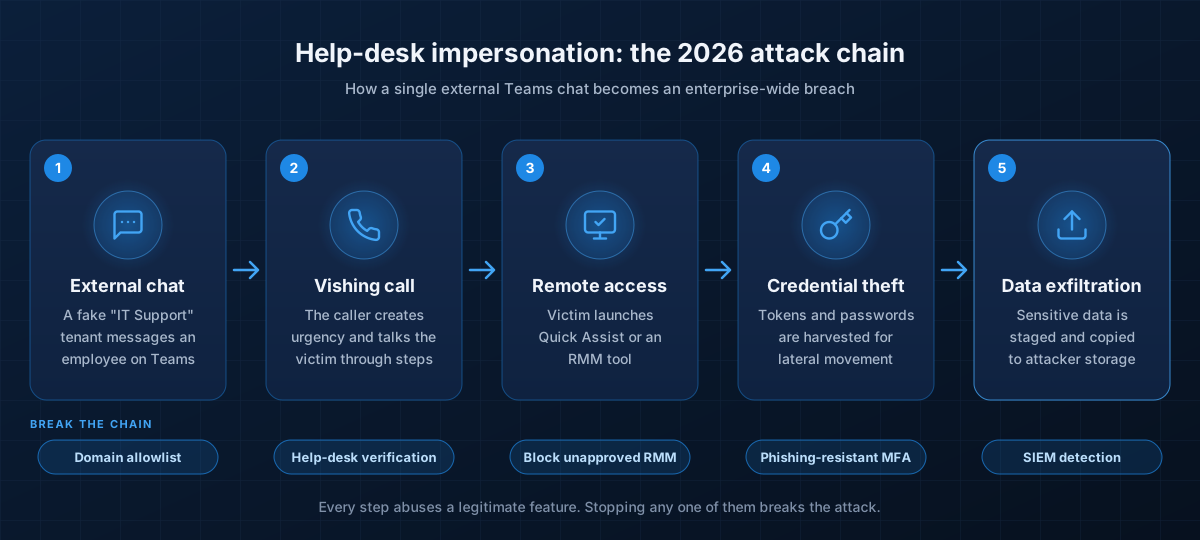 A typical 2026 help-desk impersonation chain. Every step abuses a legitimate feature, which is why controls must cover identity, endpoints and people together.
Deepfake voice and video
Real-time voice cloning and face swapping are now good enough to fool colleagues on a short call. Pindrop's 2026 Deepfake Readiness Index found that 74% of large US enterprises had encountered or suspected a deepfake attack in the past year, yet only 10% have purpose-built defenses. Among affected organizations, nearly half reported costs of $500,000 or more. Help desks, finance teams and executive assistants are the primary targets.
Chat-based phishing
KnowBe4 tracked a 41% rise in Teams-based attacks between October 2025 and March 2026, driven largely by the default ability for anyone to start a chat with any email address. Because chat feels informal and fast, users tend to reply first and verify later.
AI notetakers and shadow AI
AI meeting assistants now join a large share of meetings, often through calendar or OAuth integrations that IT never approved. Recordings, transcripts and summaries end up in third-party clouds with unclear retention and training terms, and legal advisers have warned in 2026 that these records create new privilege, consent and discovery risks.
Toll fraud and SIP attacks
Classic voice threats have not gone away. Internet-exposed PBXs and weak SIP trunk credentials still fuel toll fraud and international revenue share fraud (IRSF), where attackers route thousands of calls to premium numbers they control, usually over a weekend when nobody is watching.
"Harvest now, decrypt later"
Encrypted signaling and media captured today could be decrypted once quantum computers mature. Communications that must stay confidential for years, such as board, legal and M&A calls, are already in scope for post-quantum planning.
10 Best Practices for UC Security in 2026
1. Lock down external access and federation
Open federation is the root cause of most Teams-based attacks. Review your external access settings before anything else:
- Change Teams external access from "all external domains" to an allowlist of trusted partner domains.
- Block trial tenants, which attackers favor because they are free and disposable:
Set-CsTenantFederationConfiguration -ExternalAccessWithTrialTenants "Blocked". - Turn off chat with unmanaged (consumer) Teams accounts unless there is a clear business need.
- If your organization does not need cold inbound contact, prevent external users from starting conversations and restrict the "Chat with anyone" feature.
- Apply equivalent restrictions in Webex Control Hub and Zoom, which both support blocking external users and limiting in-meeting features such as file transfer and remote control.
2. Make identity phishing-resistant
Every UC session starts with an identity. In 2026, SMS codes and push approvals are no longer enough.
- Require phishing-resistant MFA such as passkeys, FIDO2 security keys or Windows Hello for Business, starting with administrators, executives, finance and help desk staff.
- Use Conditional Access so that UC apps can only be used from compliant, managed devices, and require stronger checks for admin portals.
- Review guest and external identity settings: limit who can invite guests and scope sharing to existing guests only.
- Shorten session lifetimes for privileged roles and revoke sessions automatically when risk is detected.
3. Verify the human, not just the account
Deepfakes and impersonation succeed because a familiar voice or a convincing display name feels like proof. Replace that feeling with process:
- Publish a clear rule: IT will never contact you first through an external Teams chat or call. Show employees what the "External" label looks like.
- Use help-desk authentication phrases or ticket numbers so employees can confirm a support call is real.
- Require callback verification to a known number for password resets, MFA re-registration and any request for remote access.
- Require out-of-band, multi-person approval for payments, banking changes and data exports, regardless of who appears to be asking on a call.
- For high-risk channels such as the help desk, contact center and executive lines, evaluate deepfake detection. Webex now offers deepfake detection and prevention, and several specialist vendors cover voice.
- Run regular vishing and deepfake simulations, not just email phishing tests.
4. Control remote-support tools
The help-desk attack only works if the victim can hand over their desktop.
- Remove or block Microsoft Quick Assist where it is not required.
- Maintain an allowlist of approved RMM and remote-support tools, and block or alert on everything else.
- Require device or identity checks before any remote support session begins.
- Restrict administrative protocols such as WinRM to dedicated management workstations, and enable attack surface reduction rules to block script-based payloads.
5. Match meeting controls to meeting sensitivity
Not every meeting needs the same protection. Define two or three tiers and enforce them with templates and sensitivity labels rather than relying on organizers to remember.
- Standard meetings: lobby for external participants, no anonymous join, presenter roles limited to the organizer.
- Confidential meetings: require unverified participants to confirm their identity with a one-time passcode, restrict recording and transcription, block copying of chat and transcripts, and apply watermarking to shared content.
- Highly confidential meetings: enforce end-to-end encryption, lock the meeting once it starts, and disable AI capture entirely.
Teams Premium, Webex and Zoom all support most of these controls, including detection of sensitive content during screen sharing.
6. Govern AI notetakers and meeting data
Treat recordings, transcripts and AI summaries as business records, because that is what they are.
- Publish an approved list of AI meeting assistants and block unapproved bots from joining.
- Contract for no model training on your data, defined retention periods, deletion on request and known data locations.
- Classify meetings and prohibit AI capture for legal, HR, board, M&A and other privileged discussions.
- Make sure participants are notified and, where the law requires it, give consent before recording or AI processing begins.
- Add recordings, transcripts and summaries to your retention schedules and legal-hold processes, and label AI summaries as drafts until a person reviews them.
7. Encrypt everything, and plan for post-quantum
Encryption remains the baseline, but the bar has risen.
- Enforce TLS 1.3 for SIP signaling and SRTP for media on every trunk, SBC and endpoint. Retire TLS 1.0 and 1.1 and plan to retire 1.2.
- Use mutual TLS between your session border controllers (SBCs) and carriers wherever it is supported.
- Start a post-quantum cryptography inventory for your UC stack. The UK NCSC now recommends hybrid post-quantum TLS configurations and notes that only TLS 1.3 supports them. Ask your UC and SBC vendors for their roadmaps.
8. Harden the SIP edge
Your SIP trunks and SBCs are the boundary between your voice network and the public telephone network.
- Place a session border controller in front of every trunk to hide internal addressing, drop malformed traffic and enforce call admission control.
- Restrict SIP traffic to your carriers' IP ranges, replace any default credentials and rate-limit registration attempts.
- Set hard limits on toll fraud: concurrent outbound calls, per-destination volumes and calls to high-risk international ranges, with automatic blocking rather than an alert nobody reads.
- In the US, confirm that your providers sign calls with STIR/SHAKEN using their own certificate. FCC rules in effect since September 2025 require every obligated provider to hold its own certificate.
9. Segment the network and manage UC endpoints
Desk phones, room systems and headsets are computers too.
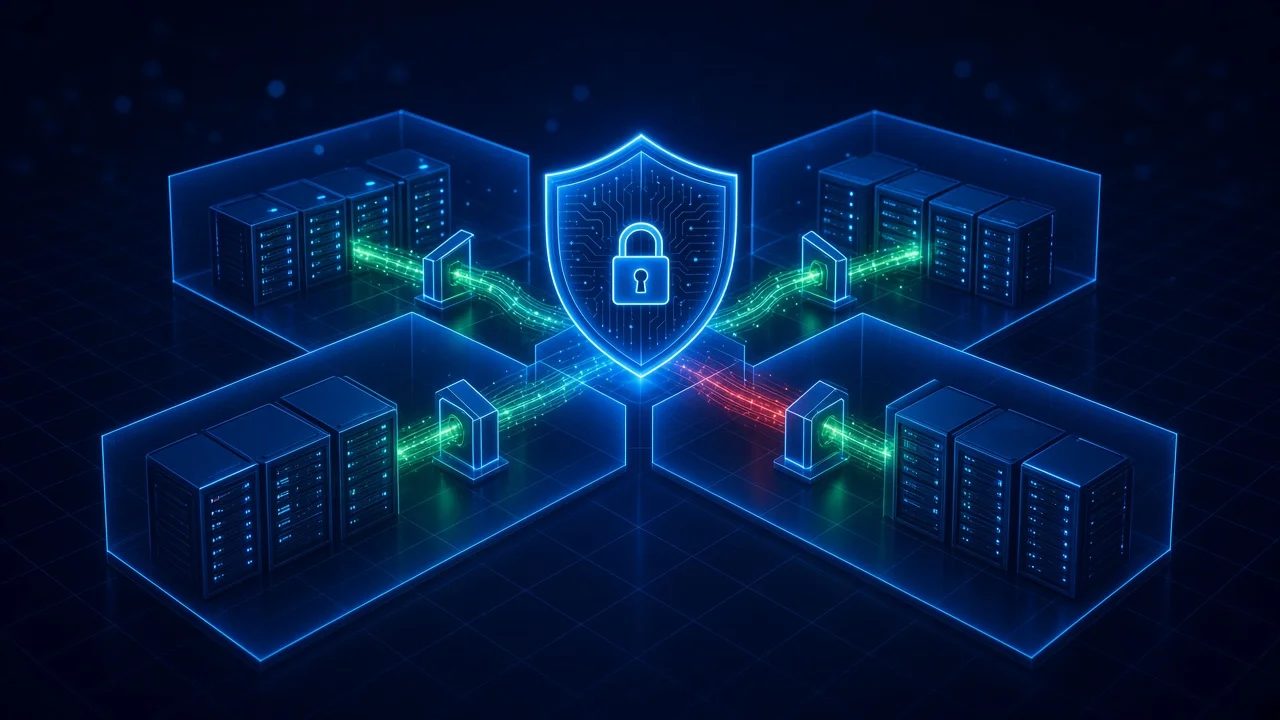
- Keep voice and video on dedicated VLANs with firewall policy between UC, user and server segments.
- Manage Teams Rooms, Webex devices and Zoom Rooms through their device management platforms. Change default admin passwords and keep firmware current.
- Disable unused services such as web admin pages, SSH and Bluetooth pairing on endpoints.
- Include UC endpoints in vulnerability scanning and asset inventory.
10. Monitor, detect and rehearse
Assume some attacks will get through, and make sure you see them quickly.
- Enable Safe Links and Zero-hour auto purge (ZAP) for Teams so malicious URLs are blocked at click time and removed after delivery.
- Send UC audit logs, call records and admin activity to your SIEM.
- Build detections for the attack chain itself, for example an external Teams chat or call followed by a remote-support tool install on the same device within minutes.
- Alert on unusual call patterns, mass external chats and new federation with unfamiliar domains.
- Write and rehearse a UC incident playbook covering session revocation, device isolation, credential rotation and communication with staff.
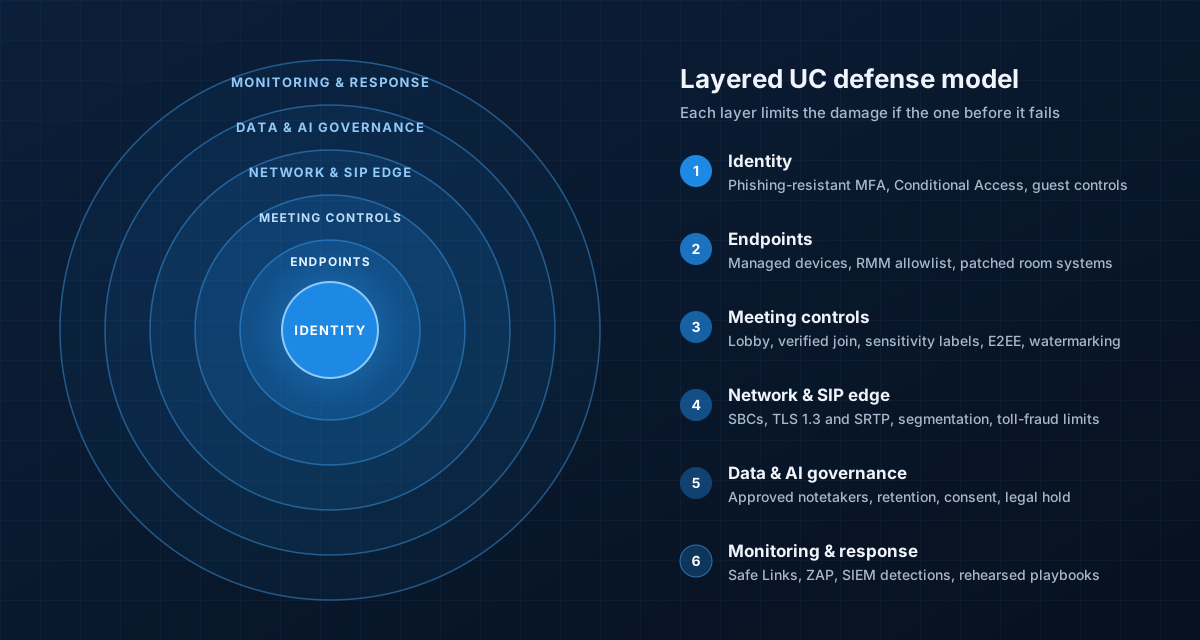 No single control stops modern UC attacks. Each layer limits what an attacker can do if the one before it fails.
A 90-Day Action Plan
You do not need to do everything at once. This sequence closes the most exploited gaps first.
Days 0 to 30: close the front door
- Restrict Teams external access to allowed domains and block trial tenants.
- Communicate the "IT will never contact you externally" rule and the help-desk verification process.
- Block or restrict Quick Assist and unapproved remote-support tools.
- Turn on Safe Links and ZAP for Teams.
Days 31 to 60: strengthen identity and meetings
- Roll out phishing-resistant MFA to admins, executives, finance and help desk staff.
- Enforce Conditional Access with compliant devices for UC apps.
- Publish meeting sensitivity tiers and templates, and approve or block AI notetakers.
- Run your first vishing simulation.
Days 61 to 90: harden infrastructure and operations
- Audit SBCs, SIP trunks, encryption settings and toll-fraud thresholds.
- Review UC endpoint firmware, admin credentials and network segmentation.
- Deploy SIEM detections for the help-desk attack chain.
- Run a tabletop exercise based on a deepfake executive call or help-desk compromise.
Quick Checklist
- External access restricted to an allowlist, trial tenants blocked
- Phishing-resistant MFA for all high-risk roles
- Help-desk verification process published and tested
- Quick Assist and unapproved RMM tools blocked
- Meeting tiers enforced with labels or templates
- Approved AI notetaker list, retention and consent rules in place
- TLS 1.3 and SRTP enforced, post-quantum inventory started
- SBC in front of every trunk, toll-fraud limits active
- UC endpoints patched, segmented and inventoried
- UC logs in the SIEM, playbook rehearsed
Conclusion
In 2026, attackers do not need to break your encryption. They just need one employee to accept a call from "IT". The organizations that stay ahead treat collaboration platforms as a core part of their attack surface: they control who can reach their people, verify identities through process rather than gut feeling, govern the data their meetings produce and watch for the attack chain end to end.
XeroStop helps enterprises assess, harden and monitor Microsoft Teams, Webex, Zoom and enterprise voice environments. If you want a second set of eyes on your UC security posture, talk to our team.
Sources
- Microsoft: 2026 Digital Defense Report
- Microsoft Security Blog: Impersonating IT support (September 2026)
- Microsoft Security Blog: Cross-tenant helpdesk impersonation to data exfiltration (April 2026)
- Microsoft Security Blog: Disrupting threats targeting Microsoft Teams
- Unit 42: Spring Ring, voice phishing campaigns in Microsoft Teams
- Gartner: 41% of CISOs reported a deepfake social engineering incident (September 2026)
- KnowBe4: Phishing Threat Trends Report, Volume 7
- Pindrop: 2026 Deepfake Readiness Index
- Microsoft Learn: Teams Premium protection features
- Cisco: Webex Suite Meetings Security technical paper
- UK NCSC: Post-quantum updates to TLS guidance
- Federal Register: FCC STIR/SHAKEN third-party authentication rules
- CISA: Cybersecurity recommendations for video conferencing