Key Takeaways
- The best LLM use cases in IT ops are bounded and checkable. Summaries, ticket routing, knowledge search and runbook drafts work because a person can quickly verify the output.
- Start in the service desk and incident review, not in production changes. Low-risk, data-ready pilots build trust and produce measurable results within weeks.
- Your data matters more than your model. Poor data quality is the number one barrier to agentic AI in ITSM, ahead of governance and skills.
- Most use cases do not need fine-tuning or agents. A managed model plus retrieval over your own runbooks and tickets (RAG) covers most of the list.
- Anything that changes a system needs a human approval gate, scoped permissions and an audit trail, at least until the use case has earned more autonomy.
- Treat these 19 examples as patterns to evaluate, not guaranteed results. "Actually works" means the task, data, metrics and review process fit together.
Introduction
IT teams were among the first to put large language models (LLMs) to real work, and in 2026 they are still ahead of the rest of the business. McKinsey's State of AI 2026 survey found that nearly nine in ten organizations now use AI regularly in at least one function, and that IT is the function where AI agents most often reach the scaling phase (12%), just ahead of knowledge management (11%) and software engineering (10%).
The service desk is moving fastest. In TeamDynamix's State of AI in ITSM report, 87% of organizations already use AI in IT service management or expect to within 24 months. Among those using it, 82% report ticket deflection, 71% report faster resolution and 76% report higher satisfaction.
Not every project succeeds, though. Gartner predicts that more than 40% of agentic AI projects will be canceled by the end of 2027 because of rising costs, unclear value or weak risk controls. Its 2026 Hype Cycle for AI in ITSM makes the same point from the other side: valuable outcomes depend on proper governance and solid ITSM data. The difference between a useful LLM project and an expensive experiment usually comes down to picking the right use case and building the right guardrails around it.
This guide covers 19 practical LLM use cases across six areas of IT operations: the service desk, incident and problem management, knowledge and runbooks, network and unified communications (UC), security and compliance, and automation. For each one you will find what it does, a real-world example, its risk level and the implementation pattern that fits best.
What Makes an LLM Use Case "Actually Work" in IT Ops
An LLM use case works when the task is bounded, the data is available, the output can be checked and the risk controls match the stakes. It does not mean guaranteed ROI or safe autonomous decisions. Test every idea against five questions:
- Task fit: Is the work language-heavy (tickets, logs, documents, chat) and useful even when a person reviews it?
- Data readiness: Are the tickets, runbooks, CMDB records or logs available, current and clean enough?
- Measurability: Can you check outputs against past tickets, labeled samples or a reviewer's judgment?
- Risk and review: What happens if the output is wrong? Who approves it, and is there an audit log?
- Infrastructure need: Does it need only a managed model, or also retrieval, tool access, fine-tuning or self-hosting?
Developers have already learned this lesson. In the Stack Overflow 2026 Developer Survey, 48% of respondents trust AI output only when they can easily verify it, and just 6.6% trust it for important work decisions. IT operations should start from the same mindset.
How to Prioritize LLM Use Cases
Score each candidate on two things: how much value it creates, and how much damage a wrong answer could cause. The best first pilots sit in the top-left corner: high value, low risk and easy to review.
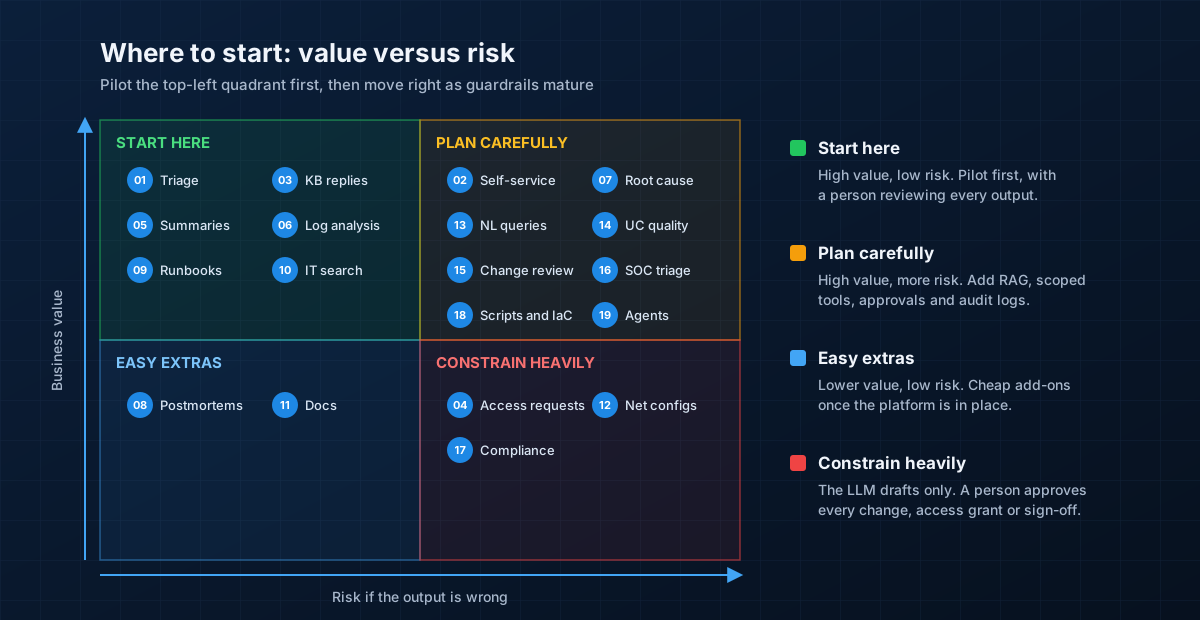 Start with high-value, low-risk use cases such as ticket triage, incident summaries and IT knowledge search. Move right only as guardrails mature.
A few practical rules help:
- Prefer workflows that already exist. Making an existing process faster is easier than inventing a new one.
- Keep the model as an assistant at first. Let it draft, summarize, classify and suggest. Let people decide.
- Pick something you can measure in 30 days, such as triage accuracy, handle time or time to first update.
- Avoid giving the model final authority over access grants, production changes or compliance sign-off.
The 19 Use Cases at a Glance
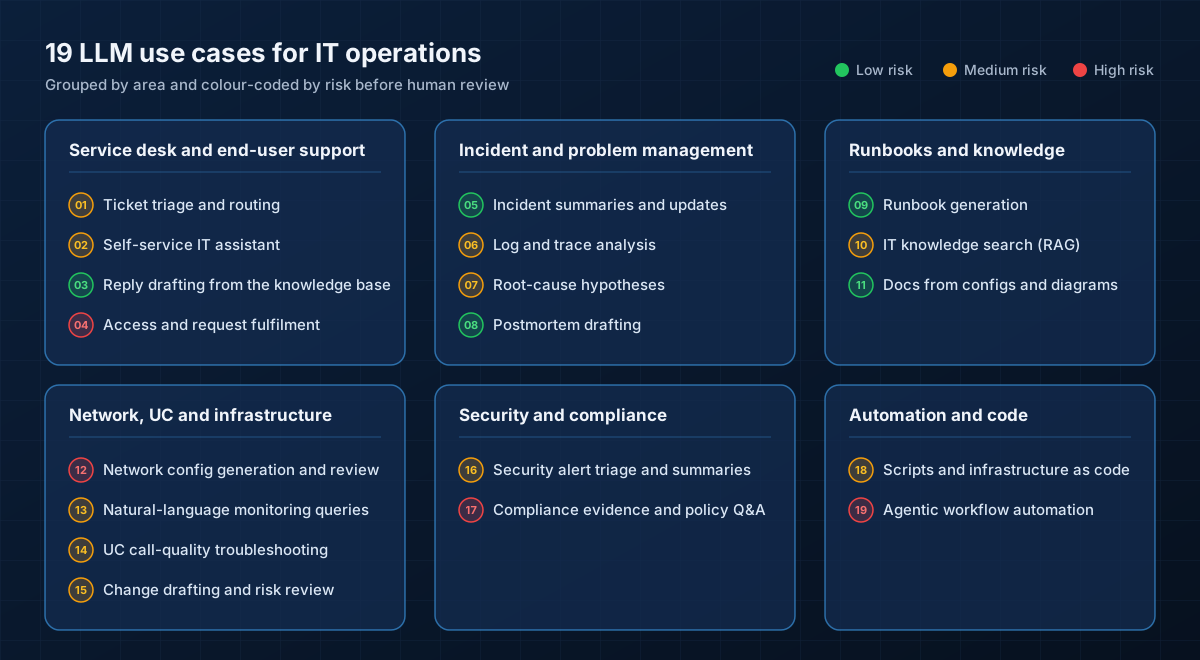 The 19 use cases grouped by area. Green means low risk, amber means medium risk and red means a person must stay in control.
Service Desk and End-User Support
The service desk is where most organizations start, because it combines high ticket volumes, plenty of historical data and outputs that are easy to check.
1. Ticket triage and routing
The model reads incoming tickets and assigns a category, priority, affected service and resolver group. It can also spot duplicates and link tickets to an open major incident. This works best when you already have a stable category list and enough labeled historical tickets to test against.
Example: A user writes "Teams keeps dropping when I'm on the VPN". The model tags it as Collaboration, links it to a known VPN incident and routes it to the network team instead of the desktop queue.
- Risk level: Medium. A misroute slows a ticket down but rarely causes harm. Track the misroute rate against a labeled sample.
- Best pattern: Prompt-only or batch classification, with fine-tuning only for very high volumes.
2. Self-service IT assistant with escalation
A chat assistant in Teams, Slack or the IT portal answers common questions ("How do I set up MFA on my new phone?") from approved knowledge articles, and hands over to a person when it is unsure. TeamDynamix reports that its customers see 30% to 60% ticket deflection with virtual agents.
Example: An employee asks how to connect to the office Wi-Fi from a personal laptop. The assistant answers with the approved guest network procedure and a link to the source article.
- Risk level: Medium. It faces users directly, so it needs confidence thresholds, clear escalation and logging.
- Best pattern: RAG over your approved knowledge base.
3. Agent reply drafting from the knowledge base
Instead of answering users directly, the model drafts a reply for the service desk agent, with citations to the knowledge article it used. The agent edits and sends it. This is one of the safest high-value pilots, because a person checks every word.
Example: For a printer driver ticket, the model drafts step-by-step instructions from the relevant article, and the agent adjusts them for the user's operating system.
- Risk level: Low. A person reviews every reply before it goes out.
- Best pattern: RAG with citations, built into the ITSM agent workspace.
4. Access and service request fulfilment
The model turns a free-text request ("I need access to the finance SharePoint and the Power BI workspace") into a structured request, checks it against policy and routes it for approval. With tool access it can carry out the request once approved. Fixify's 2026 benchmark of more than 50,000 tickets found that identity and access tickets resolved with AI automation closed in a median of 2.9 hours, against 65.7 hours without automation.
Example: A new starter's manager asks for standard sales tools. The model fills in the request form, attaches the role-based template and sends it to the application owner for approval.
- Risk level: High. Access changes are a security control, so a person must approve every grant.
- Best pattern: Tools and agents with least-privilege service accounts and approval gates.
Incident and Problem Management
During an incident, engineers spend a surprising amount of time reading, summarizing and writing updates. LLMs are very good at exactly that work.
5. Incident summaries and stakeholder updates
The model reads the incident ticket, chat channel and timeline and produces a short summary: what happened, who is affected, what has been tried and what is next. It can draft updates for technical teams, service owners and executives in the right tone for each.
Example: Forty minutes into an outage, a new on-call engineer asks the assistant for a summary and gets a five-line status instead of scrolling through 300 chat messages.
- Risk level: Low. The incident commander reviews updates before they are sent.
- Best pattern: Prompt-only, connected to your chat and ITSM tools.
6. Log and trace analysis
LLMs can explain unfamiliar error messages, group similar log lines and summarize what changed around the time of a failure. They are a fast first pass, not a replacement for exact queries in your observability platform.
Example: An engineer pastes a Java stack trace and the last 200 log lines. The model explains that the connection pool is exhausted and suggests the three queries to confirm it.
- Risk level: Medium. Suggestions can be wrong, and logs often contain secrets, so filter tokens, passwords and personal data before sending them to a model.
- Best pattern: Prompt-only for ad-hoc analysis, or tools that let the model run read-only queries.
7. Root-cause hypotheses
Given alerts, recent changes and topology data, the model proposes a ranked list of likely causes with the evidence for each. Engineers confirm or rule them out. In the State of Agentic AI in ITSM 2026 survey, autonomous incident triage and resolution was the joint most common agentic use case (18%).
Example: After a spike in failed logins, the model points to a certificate renewed on the identity provider 20 minutes earlier, and links the change record.
- Risk level: Medium. A confident wrong answer can send a team down the wrong path, so always show the evidence.
- Best pattern: RAG plus read-only tool access to monitoring, CMDB and change data.
8. Postmortem drafting
The model assembles a first draft of the post-incident review from the timeline, chat history and ticket notes: impact, timeline, contributing factors and proposed actions. The team then focuses on analysis instead of copying and pasting.
Example: A draft postmortem is ready the morning after a major incident, and the review meeting spends its time on the action items instead of rebuilding the timeline.
- Risk level: Low. The draft is reviewed and edited by the incident owner.
- Best pattern: Prompt-only, using exported incident data.
Runbooks, Knowledge and Documentation
Knowledge is the fuel for almost every other use case. TeamDynamix found that 88% of AI adopters in ITSM use AI for knowledge management, gap identification and content creation.
9. Runbook generation
The model turns resolved tickets, chat threads and engineer notes into structured runbooks with prerequisites, steps, checks and rollback. It can also flag runbooks that no longer match the current environment.
Example: After the third ticket about the same SBC (session border controller) registration failure, the model drafts a runbook from the resolution notes for the voice team to review.
- Risk level: Low. A subject-matter expert approves every runbook before it is published.
- Best pattern: Prompt-only or RAG over past tickets.
10. Internal IT knowledge search (RAG)
Engineers ask questions in plain language ("What is the failover procedure for the primary data center firewall?") and get an answer with links to the source documents. This replaces hunting across wikis, SharePoint sites and old tickets.
Example: A junior engineer on night shift finds the correct escalation path and change window for a core switch in seconds, with a link to the approved document.
- Risk level: Medium. Answers are only as good as the documents behind them, and search must respect existing permissions.
- Best pattern: RAG with permission-aware retrieval and visible citations.
11. Documentation from configs and diagrams
The model reads router configs, firewall rules, Terraform files or architecture diagrams and writes human-readable documentation: what each component does, how traffic flows and what depends on what.
Example: A legacy branch office has no documentation. The model reads the router and firewall configs and produces a one-page summary of VLANs, routing and VPN tunnels.
- Risk level: Low. It describes existing systems and does not change them, though configs must be sanitized first.
- Best pattern: Prompt-only, using sanitized configuration exports.
Network, UC and Infrastructure
Network and unified communications teams deal with dense, vendor-specific configuration and large volumes of telemetry, which makes them a strong fit for LLM help.
12. Network config generation and review
The model drafts configuration snippets (VLANs, ACLs, BGP neighbors, QoS policies) from a plain-language request, or reviews a proposed change for errors and policy violations. Generated configs must still go through peer review and automated validation before deployment.
Example: An engineer asks for a QoS policy that prioritizes Teams and Webex voice traffic on a branch router. The model drafts it, and the reviewer checks it against the standard template.
- Risk level: High. A bad config can take down a site, so never let a model push changes directly.
- Best pattern: Prompt-only for drafting, with linting, lab testing and change approval before deployment.
13. Natural-language monitoring queries
Instead of learning each tool's query language, engineers ask "Which sites had packet loss above 2% yesterday?" and the model writes and runs the query against your monitoring or observability platform. The engineer sees both the answer and the query behind it.
Example: A service manager asks for the top five applications by bandwidth at the head office last week and gets a chart without opening a ticket with the network team.
- Risk level: Medium. Show the generated query, keep access read-only and validate results for important decisions.
- Best pattern: Tools and agents with read-only access to monitoring data.
14. UC call-quality troubleshooting
Voice and video problems produce noisy data: jitter, packet loss, latency and MOS (mean opinion score) for thousands of calls. The model correlates poor-quality calls with sites, networks, devices and time, then explains the likely cause in plain language.
Example: Users complain about choppy Teams calls. The model finds that most bad calls come from one site over Wi-Fi during the afternoon and points to a congested access point.
- Risk level: Medium. Correlation is not causation, so engineers confirm findings before changing anything.
- Best pattern: RAG plus tool access to UC analytics and network monitoring.
15. Change request drafting and risk review
The model drafts change requests from an engineer's notes, including the implementation plan, test steps and rollback. It can also compare a proposed change with past failed changes and highlight risks for the change advisory board.
Example: For a firewall upgrade, the model drafts the change record and warns that a similar upgrade last year failed because of a licensing issue.
- Risk level: Medium. The change advisory board still makes the decision.
- Best pattern: RAG over past change records and incidents.
Security and Compliance
Security teams face the same alert overload as operations teams, but with higher stakes. LLMs can help analysts move faster, as long as they stay in charge.
16. Security alert triage and summaries
The model summarizes security alerts, enriches them with asset and user context, and explains in plain language what happened and why it matters. Analysts get a head start on each case instead of reading raw events.
Example: For an impossible-travel sign-in alert, the model summarizes the user's recent activity, device and location history and suggests whether it looks like a VPN artifact or a real compromise.
- Risk level: Medium. The analyst makes the call, and the model must never close incidents on its own.
- Best pattern: RAG plus read-only access to SIEM and identity data.
17. Compliance evidence and policy Q&A
The model answers questions about internal IT policies and helps gather evidence for audits, such as mapping controls to configuration exports, tickets and logs. It supports the compliance team and does not sign anything off.
Example: Ahead of an ISO 27001 audit, the model maps each control to the relevant policy section and recent evidence, and highlights the gaps for the compliance lead.
- Risk level: High. Wrong answers create audit and legal exposure, so a person must review every output.
- Best pattern: RAG over versioned policies, with full source traceability.
Automation and Code
LLMs are now part of everyday scripting. In the Stack Overflow 2026 survey, 66% of developers use coding assistants or agents. For IT teams, this means faster scripts and infrastructure code, and the first steps toward bounded automation.
18. Scripts and infrastructure as code
The model writes and explains PowerShell, Bash and Python scripts, Ansible playbooks and Terraform modules. It is also useful for explaining inherited scripts nobody understands anymore. Most developers already treat AI code with caution: 76.5% run it locally before using it and only 9.6% use answers as-is.
Example: An engineer asks for a PowerShell script that reports all mailboxes over 90% of quota. The model drafts it, and the engineer tests it in a non-production tenant first.
- Risk level: Medium. Generated code must go through review, testing and version control like any other code.
- Best pattern: A coding assistant connected to your repositories and CI pipeline.
19. Agentic workflow automation
Here the model plans and carries out a multi-step task using tools: diagnose a full disk, clear temporary files, confirm the service is healthy and update the ticket. This is the most powerful pattern and also the riskiest. In the State of Agentic AI in ITSM 2026 survey, only 6% of organizations run AI that is largely autonomous across multiple ITSM processes, and 15% are partially autonomous in limited processes.
Example: When a disk-space alert fires on a non-production server, an agent runs the approved cleanup runbook, verifies free space and closes the alert, with every action logged.
- Risk level: High. Start with low-risk, reversible actions in non-production, and require approval for anything else.
- Best pattern: Tools and agents with scoped identities, sandboxing, approval gates, rate limits and audit logs.
Implementation Patterns Behind the Use Cases
The 19 use cases rely on a small number of building blocks. Choosing the simplest one that works keeps cost, risk and effort down.
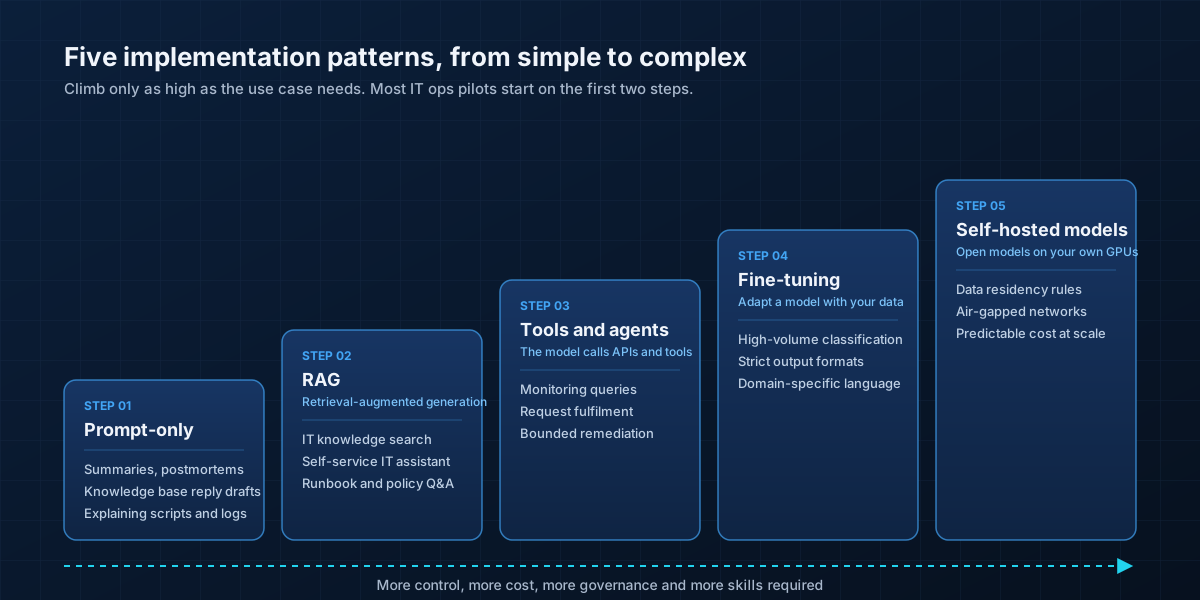 Each step adds control but also cost, governance and skills. Most IT ops pilots only need the first two steps.
- Prompt-only: the model works only with what you give it, such as a ticket, a log extract or a chat transcript. Ideal for summaries, drafts and explanations.
- RAG (retrieval-augmented generation): the system first searches your own runbooks, tickets and documents, then passes the most relevant passages to the model. Use it whenever answers must reflect your environment. RAG reduces made-up answers but does not eliminate them, so keep citations visible.
- Tools and agents: the model can call APIs, run queries or trigger automation. Use it when the model needs live data or must act, and treat it like a new team member with tightly scoped access.
- Fine-tuning: you adapt a model using your own labeled examples. It is worth it only for high-volume, repeatable tasks such as ticket classification, and only when you have clean training data and test sets. It is not a fix for weak prompts or missing context.
- Self-hosted models: open models running on your own GPUs or a private cloud. Consider them when data residency, air-gapped networks or cost at very high volumes rule out managed services.
A Reference Architecture for LLMs in IT Ops
Most successful deployments share the same shape: the model is grounded in your own IT data, answers come with citations, and anything that changes a system passes through a person.
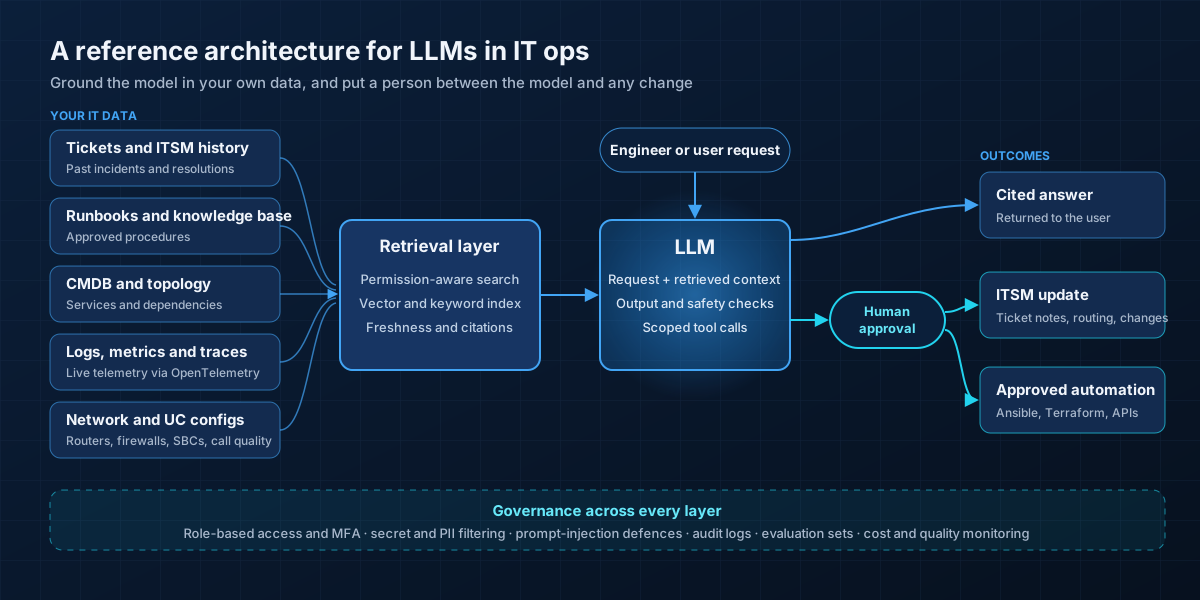 Answers flow straight back to the user. Ticket updates and automation pass a human approval gate, and governance applies across every layer.
- Your IT data: ITSM tickets, runbooks, the CMDB and topology, logs, metrics and traces, and network and UC configurations.
- Retrieval layer: a search index that respects existing permissions, so users can only retrieve what they could already see. It must also track how fresh each document is.
- The LLM: combines the user's request with retrieved context, checks its own output and calls tools only within a defined scope.
- Human approval gate: required for ticket changes, access grants and any automation, until a use case has proven itself.
- Outcomes: cited answers, ITSM updates and approved automation through tools such as Ansible, Terraform or platform APIs.
- Governance: access control, secret and personal-data filtering, prompt-injection defences, audit logs, evaluation sets and monitoring of quality and cost.
Risk and Verification Checklist Before Production
AI is quickly becoming part of the attack surface. IBM's Cost of a Data Breach Report 2026 found that AI-related breaches grew to 21% of organizations, up from 13%, and that 92% of the organizations affected lacked proper AI access controls. Incidents involving shadow AI, where staff use unapproved tools, more than doubled to 43%. Before any LLM use case goes live, check the following:
- Data quality: source documents are accurate, current, owned by a team and correctly permissioned.
- Output quality: you have a test set of real tickets or questions and a target accuracy agreed with the business.
- Retrieval reliability: search returns the right documents, citations work, and stale or draft content is excluded.
- Security: test for prompt injection, which tops the OWASP Top 10 for LLM Applications 2026, and for sensitive data leaking through logs, tickets or configs.
- Least privilege: agents use their own identities with only the permissions they need. OWASP ranks "excessive agency" third on its 2026 list.
- Human oversight: clear rules on which outputs need review and who approves actions.
- Operations: logging, monitoring, rollback and an incident process for when the AI itself goes wrong.
- Approved tools: a sanctioned list of AI tools, so engineers do not paste configs and customer data into unapproved services.
Where LLMs Are a Bad Fit in IT Ops
LLMs are not the right tool for every job. Be cautious, or choose a different approach, when:
- The logic is already clear and deterministic. Threshold alerts, scheduled jobs and rule-based routing are cheaper and more predictable with traditional automation.
- Mistakes are severe and hard to reverse, such as deleting data, changing core routing or revoking access at scale.
- The model would need broad, unsupervised access to production systems or sensitive data.
- Exact calculations are required, such as capacity forecasts, license counts or billing. Let the model explain the numbers, not calculate them.
- There is no reliable source data. If the runbooks are wrong, a RAG assistant will confidently repeat the mistakes.
Safer alternatives include narrowing the task to drafting or summarizing, adding deterministic validation (config linting, policy checks, test suites), and piloting with internal users before anything customer-facing.
Measuring Success
Agree on a baseline before the pilot starts, then track a small set of metrics:
- Mean time to resolve (MTTR) and time to first response for the tickets in scope.
- Ticket deflection rate for self-service, along with the share of users who come back with the same issue.
- Misroute rate for triage, measured against a labeled sample.
- Agent handle time and first-contact resolution.
- Answer accuracy and citation quality, scored by reviewers on a weekly sample.
- Toil hours saved on repetitive work such as status updates, documentation and postmortems.
- Cost per ticket or per answer, including model usage, to keep spend in line with value.
A 90-Day Pilot Roadmap
Days 0 to 30: choose and prepare
- Pick one or two use cases from the top-left of the prioritization matrix, such as ticket triage and incident summaries.
- Measure the current baseline for the metrics you care about.
- Clean up the knowledge articles and ticket categories the pilot will depend on.
- Agree on the approved AI tools, data handling rules and who reviews outputs.
Days 31 to 60: pilot with people in charge
- Run the assistant alongside the team, with a person reviewing every output.
- Collect feedback on wrong or unhelpful answers and fix the underlying data or prompts.
- Add RAG over approved runbooks and knowledge articles, with visible citations.
- Start logging every request, response and reviewer decision.
Days 61 to 90: expand carefully
- Compare results with the baseline and share them with stakeholders.
- Allow lower-risk outputs, such as internal summaries, to go out with spot checks instead of full review.
- Add a first read-only tool integration, such as monitoring queries.
- Choose the next use cases based on what worked, and only then consider low-risk, reversible automation.
Conclusion
LLMs are already doing useful work in IT operations, from routing tickets and drafting replies to explaining logs and writing runbooks. The teams getting real value are not the ones with the biggest models. They are the ones that start with bounded, checkable tasks, ground the model in clean data, measure results and keep a person in charge of anything that changes a system.
Start small, prove value in the service desk and incident review, then expand toward network, UC and automation use cases as trust grows.
XeroStop helps enterprises design and run AI-powered IT operations across infrastructure, networks and unified communications. Explore our AI solutions, AI-powered UC monitoring and intelligent network automation, or talk to our team about which LLM use cases fit your environment best.
Frequently Asked Questions
What are the best LLM use cases for IT operations?
The most practical starting points are ticket triage, agent reply drafting, incident summaries, postmortem drafting, runbook generation and internal IT knowledge search. They are high value, use data you already have and produce outputs a person can check quickly.
Which LLM use case should an IT team pilot first?
Pick a low-risk, high-volume task with a clear metric, such as ticket triage (measured by misroute rate) or incident summaries (measured by time saved). Avoid anything that changes production systems or grants access until you have guardrails in place.
Do we need RAG for IT operations?
Usually, yes. Most IT questions depend on your own environment: your runbooks, configurations, services and past incidents. RAG lets the model answer from those sources with citations. You still need to test retrieval quality and keep the documents up to date.
Should we fine-tune a model for our service desk?
Only if you have a high-volume, repeatable task such as ticket classification, plenty of clean labeled data and a test set to prove the improvement. For most teams, better prompts and RAG give better results for less effort.
Can AI agents fix incidents on their own?
For narrow, low-risk and reversible actions, such as restarting a stateless service in non-production, yes, with logging and monitoring. For anything else, agents should propose actions and a person should approve them. Only 6% of organizations in the State of Agentic AI in ITSM 2026 survey run AI that is largely autonomous across multiple processes.
How do we stop sensitive data leaking into LLMs?
Use approved AI tools only, filter secrets and personal data from logs and configs before they reach the model, make retrieval respect existing permissions, and log all usage. IBM found that 92% of organizations with AI-related breaches lacked proper AI access controls.
What is the biggest barrier to using LLMs in IT ops?
Data quality. In the State of Agentic AI in ITSM 2026 survey, poor data quality was the top barrier (32%), ahead of governance concerns about autonomous actions (30%) and a lack of internal skills (24%).
Sources
- McKinsey: The State of AI 2026
- Information and Data Manager: Agent use follows industry value, not hype (McKinsey function-level data)
- TeamDynamix: The State of AI in ITSM, From Exploration to Enterprise Impact (May 2026)
- ITSM.tools and HCL Software: The State of Agentic AI in ITSM 2026
- Fixify: 2026 IT Help Desk Benchmark Report
- Stack Overflow: 2026 Developer Survey, AI section
- Stack Overflow: 2026 Developer Survey press release
- IBM: Cost of a Data Breach Report 2026
- Gartner: Over 40% of agentic AI projects will be canceled by end of 2027
- Gartner: Hype Cycle for AI in ITSM, 2026
- OWASP: Top 10 for LLM Applications 2026